Some time back, I built a small WordPress system for a client with two separate forms. One collected registrations and made the entries available to the admin. The other collected feedback and a photo, which the admin could review before choosing five winners in the backend.
I wanted to try existing plugins first. For this project, the options I considered were either costly for the features I needed or did not cover the whole workflow in one plugin: independent registrations, photo feedback, admin access, and choosing five winners. A focused custom plugin became the answer. The two forms remained independent, so submitting feedback did not depend on a registration record.
For this article, I have rebuilt the idea as a generic workshop example to show how to create a WordPress custom database table for storing and retrieving form submissions. The plugin uses two independent tables, one for each form. I will explain each section of the plugin, including the forms, photo uploads, and admin screens. At the end of the article, I will include an installable ZIP file containing the complete plugin, along with the PHP source file and setup notes, so you can follow the explanation and then download the full example.
Table of Contents
Before you touch the database
Warning: Database changes can break your WordPress site or make data unrecoverable. If something goes wrong, you may not be able to recover without a usable backup. Take a complete backup of both the files and database first, manually or with a plugin such as All-in-One WP Migration. Keep a copy outside the site and confirm that you can restore it with your hosting setup.
Use a local installation or staging copy for this example. Check activation, submissions, photo uploads, retrieval, exports, and winner selection there before considering a live deployment. Take another fresh backup before any production database change.
Why I chose a custom plugin for this project
The requirement went beyond collecting form submissions. The registration list needed to reach the admin, while feedback needed photo review and a saved selection of exactly five winners. I wanted that complete workflow in one place.
The plugins I considered did not give me that combination at a cost and setup that suited the project. Rather than combining tools and still writing the missing judging logic, I built a small custom plugin around the actual requirements. That is a project decision, not a claim that existing plugins cannot handle similar work.
Owning the code also means owning permissions, upload handling, data retention, schema changes, and recovery. The example below keeps the structure small enough to follow while making those responsibilities visible.
When a WordPress custom database table makes sense
WordPress already stores data in tables. A WordPress custom database table adds a structure within the same database; it does not create another database. You choose columns and indexes to match the records your feature needs.
For content such as a directory or a collection of articles, a custom post type and custom fields are often a good fit. For small site settings, use the Options API. Custom tables are useful when you own a workflow whose records, validation rules, and queries are easier to express separately.
There is no automatic performance gain. A well-designed table can help a particular workload, but indexes, record counts, and query patterns determine the result. The reason for this example is a clear data model and a focused admin workflow.
Keep the two forms independent
The registration table stores an ID, name, email, and submission time. The feedback table stores its own ID, name, email, message, photo attachment ID, winner flag, and submission time. Neither table references the other.
The same email may appear once in each table. A person can submit feedback without having registered through this system. We check duplicates only inside the form being submitted, and each table has its own unique email index.
The feedback photo lives in WordPress media storage. We save its attachment ID in the feedback row instead of storing image bytes in the database. The winner flag also belongs only to feedback; selecting a winner never updates the registration table.
What I simplified for the public example
The downloadable plugin is called Workshop Entry Manager. Activation creates and publishes a registration page and a feedback page, each containing its form shortcode. The submission handlers and admin screens are included, so you do not need to build the pages or connect actions manually. The registration page uses [workshop_registration], and the feedback page uses [workshop_feedback].
I have kept names, emails, feedback, photos, admin lists, CSV exports, and five-winner selection. Extra survey questions, organisation fields, phone numbers, social handles, custom image conversion, and client-specific presentation are left out. This is a generic teaching version of the workflow.
The database and basic form and admin logic are in workshop-entry-manager.php. WordPress supplies upload and thumbnail handling. Additional CSS and JavaScript files are needed for a fuller styled, interactive interface; those files are excluded from this database-focused example. It supports WordPress 6.2 or later, PHP 7.4 or later, and one site rather than network-wide activation.
Does the download need CSS or JavaScript files
The installable ZIP contains workshop-entry-manager/workshop-entry-manager.php only. There are no separate CSS or JavaScript files to copy, and the PHP file does not reference missing assets.
The public forms use ordinary HTML controls and submit through WordPress. Your theme supplies their general appearance, while the admin tables use WordPress admin classes. Winner selection uses five numeric ID fields and server-side validation, so it does not need a checkbox-counting script.
Additional CSS files are needed for a custom form layout, gallery design, and polished admin presentation. Additional JavaScript files are needed for features such as client-side photo previews, dynamic fields, or an interactive winner-selection interface. These files are excluded from this example to keep the explanation focused on database storage and retrieval. The supplied PHP still provides the basic working forms and admin screens without them.
Does the plugin create admin screens
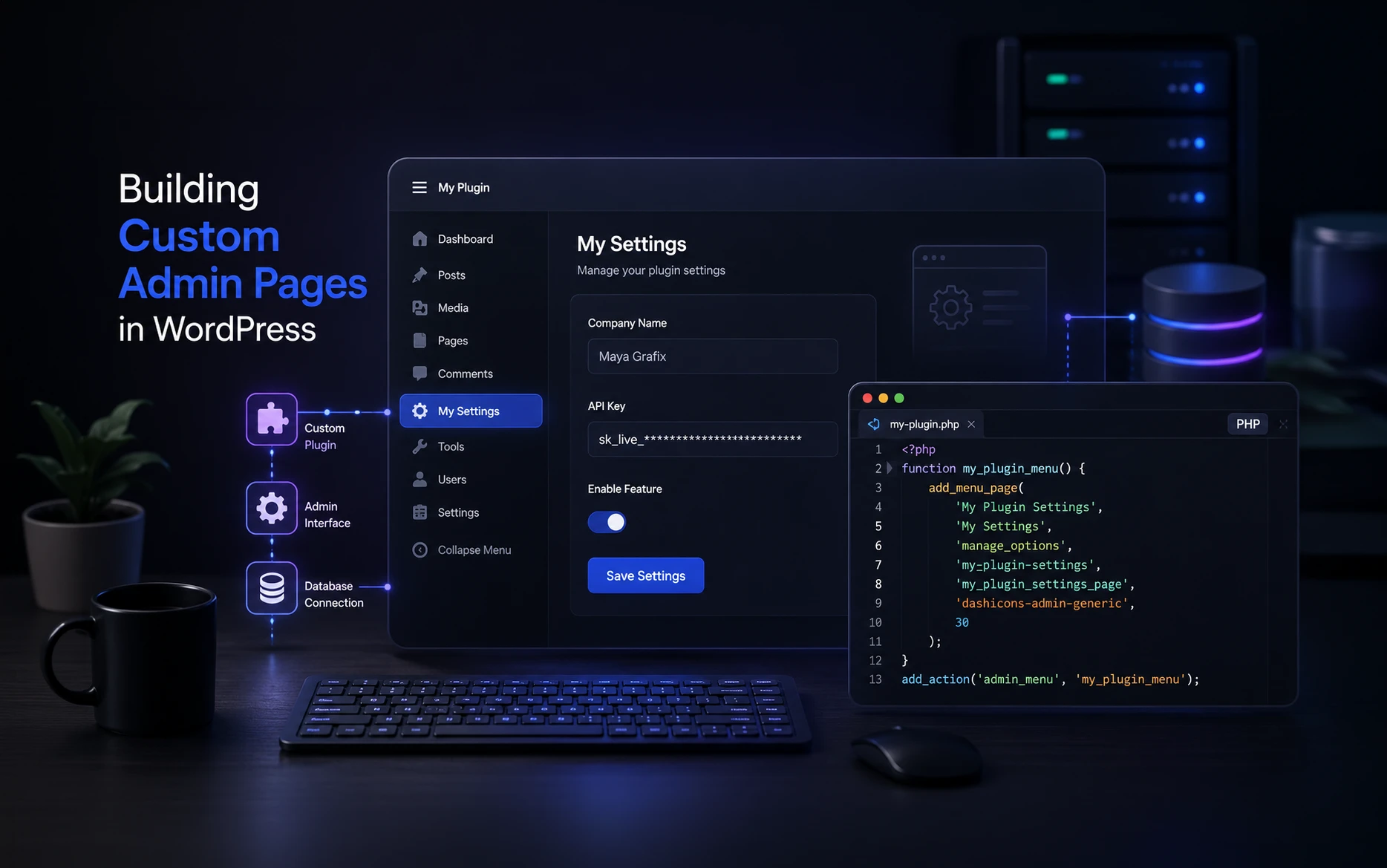
Yes. After activation, the plugin adds two screens to the WordPress dashboard: Tools > Workshop registrations and Tools > Workshop feedback. They are created by the admin_menu hook and add_management_page() calls explained in Section 8. Each admin screen includes an Open form page link to its generated public page.
The registration screen lists saved registrations and provides a CSV download. The feedback screen lists feedback and photo thumbnails, provides its own CSV download, and includes the controls for saving exactly five winners. Both screens check manage_options, so access is restricted to authorised administrators.
The admin screens are included in the PHP file and work without the excluded custom CSS and JavaScript. WordPress supplies their basic table and button styling. The plugin does not create a public entry list or public winners page.
Create the plugin folder and PHP file
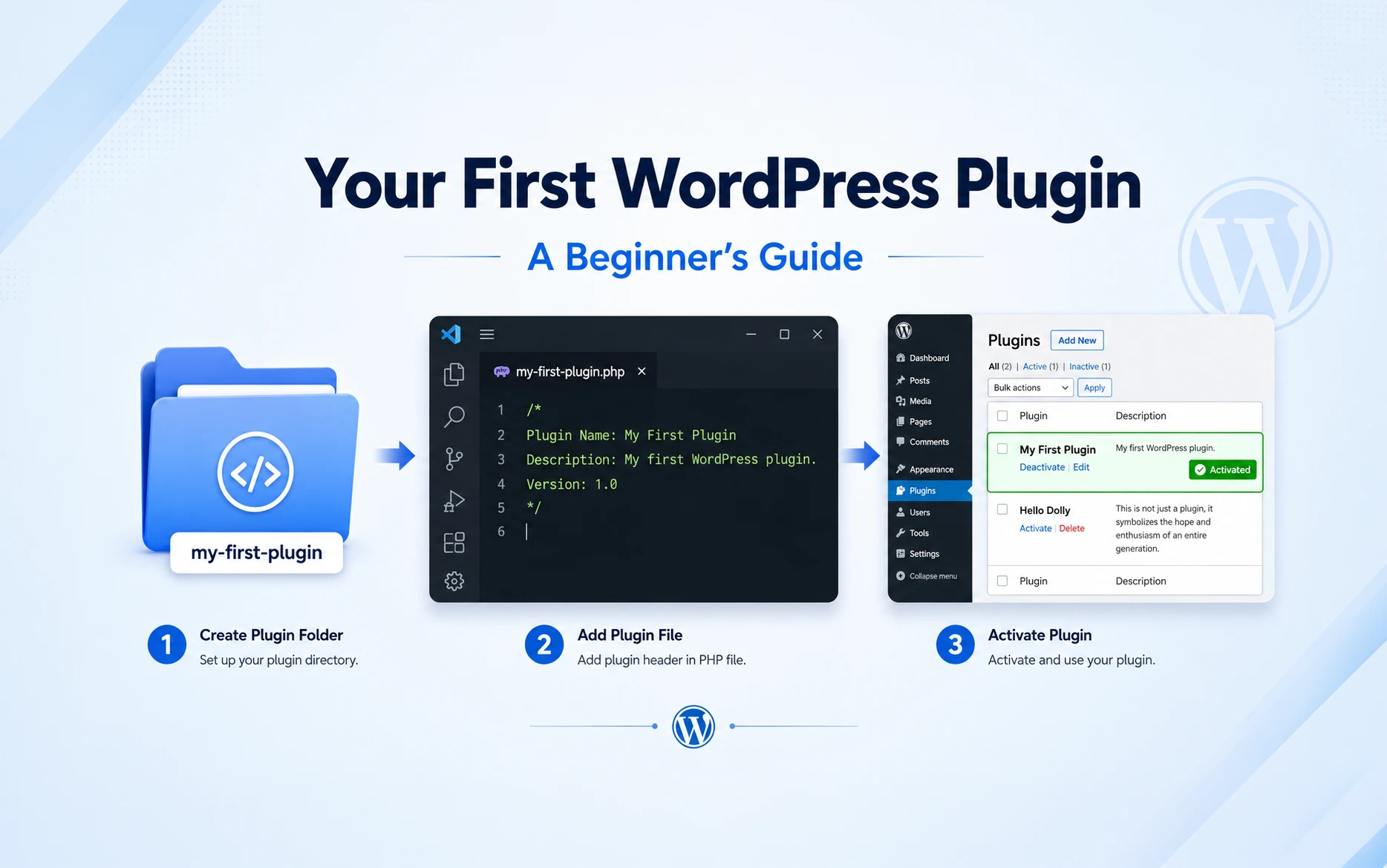
On your local or staging installation, open wp-content/plugins and create a folder named workshop-entry-manager. Inside that folder, create a file named workshop-entry-manager.php. The full path should be wp-content/plugins/workshop-entry-manager/workshop-entry-manager.php.
The eleven code sections below belong in that PHP file, in the order shown. Keep the opening <?php tag and plugin header at the top, and do not add another opening PHP tag between sections. If you download the complete PHP file instead, place it inside the same folder; it already contains all the sections.
Save the file, open Plugins in the WordPress dashboard, and activate Workshop Entry Manager after the full code is in place. To use the dashboard uploader instead, ZIP the workshop-entry-manager folder with its PHP file inside, or use the ready-made ZIP attached to this article.
A note about public photo uploads
This example uses the normal WordPress Media Library. Its image files have publicly accessible URLs, even though the feedback list is visible only to administrators. The form states this and asks for photo consent. Random filenames avoid retaining the original filename, but they do not make a photo private.
Use this approach only for photos intended to be shared. Confidential images need protected storage and authorised download delivery. The plugin does not promise to remove EXIF data from original files; do not upload sensitive location or other embedded metadata.
Public upload forms also need a real anti-spam and capacity plan. The small request throttle below is useful for demonstration, but it is not complete protection against automated uploads or distributed traffic. Review server limits, retention, privacy wording, and your site-level protections before opening a campaign.
Section 1 Set up the plugin and trusted table names
Start with the plugin header and a helper that maps our two entry types to known table names.
<?php
/**
 * Plugin Name: Workshop Entry Manager
 * Description: Independent registration and photo feedback with five winners.
 * Version: 1.1.0
 * Requires at least: 6.2
 * Requires PHP: 7.4
 */

// Section 1: Plugin setup and trusted table names.
defined( 'ABSPATH' ) || exit;
const WEM_DB_VERSION = '1.0.0';

function wem_table( $kind ) {
    global $wpdb;
    $suffixes = array(
        'registration' => 'wem_registrations',
        'feedback' => 'wem_feedback',
    );
    if ( ! isset( $suffixes[ $kind ] ) ) {
        wp_die( 'Unknown entry type.' );
    }
    return $wpdb->prefix . $suffixes[ $kind ];
}
The header makes the file a WordPress plugin. The ABSPATH guard stops direct execution outside WordPress. WEM_DB_VERSION tracks the database schema independently of future interface changes.
wem_table() accepts only registration or feedback and combines a fixed suffix with $wpdb->prefix. The table names might be wp_wem_registrations and wp_wem_feedback, but they also work when the site uses a different prefix. A request cannot supply an arbitrary table name.
Section 2 Create a WordPress custom database table with dbDelta
Both table definitions live in the same installer, but they remain separate datasets.
// Section 2: Create two independent tables.
function wem_install() {
    global $wpdb;
    $registration = wem_table( 'registration' );
    $feedback = wem_table( 'feedback' );
    $collate = $wpdb->get_charset_collate();
    require_once ABSPATH . 'wp-admin/includes/upgrade.php';
    dbDelta( "CREATE TABLE {$registration} (
        id bigint(20) unsigned NOT NULL AUTO_INCREMENT,
        name varchar(100) NOT NULL,
        email varchar(254) NOT NULL,
        created_at datetime NOT NULL,
        PRIMARY KEY  (id),
        UNIQUE KEY email (email)
    ) {$collate};" );
    dbDelta( "CREATE TABLE {$feedback} (
        id bigint(20) unsigned NOT NULL AUTO_INCREMENT,
        name varchar(100) NOT NULL,
        email varchar(254) NOT NULL,
        message text NOT NULL,
        photo_id bigint(20) unsigned NOT NULL,
        is_winner tinyint(1) unsigned NOT NULL DEFAULT 0,
        created_at datetime NOT NULL,
        PRIMARY KEY  (id),
        UNIQUE KEY email (email)
    ) {$collate};" );
    foreach ( array(
        $registration => array( 'id', 'name', 'email', 'created_at' ),
        $feedback => array( 'id', 'name', 'email', 'message', 'photo_id', 'is_winner', 'created_at' ),
    ) as $table => $required ) {
        $columns = $wpdb->get_col( $wpdb->prepare( 'SHOW COLUMNS FROM %i', $table ) );
        if ( $wpdb->last_error || array_diff( $required, $columns ) ) {
            return false;
        }
    }
    update_option( 'wem_db_version', WEM_DB_VERSION, false );
    return true;
}

function wem_activate( $network_wide ) {
    if ( is_multisite() && $network_wide ) {
        wp_die( 'Activate this example for one site, not across the network.' );
    }
    if ( ! wem_install() ) {
        wp_die( 'Table setup failed. Check protected database logs.' );
    }
    $pages = wem_create_form_pages();
    if ( is_wp_error( $pages ) ) {
        wp_die( esc_html( $pages->get_error_message() ) );
    }
}
register_activation_hook( __FILE__, 'wem_activate' );

function wem_upgrade_check() {
    if ( WEM_DB_VERSION !== get_option( 'wem_db_version' ) && ! wem_install() ) {
        wp_die( 'Workshop table setup failed. Check protected database logs.' );
    }
}
add_action( 'admin_init', 'wem_upgrade_check' );
The registration schema contains only the basic event entry. Feedback adds message, photo_id, and is_winner. Each table has its own automatic primary key and unique email index. IDs from the two tables are unrelated, even when their numeric values happen to match.
The unique email index matters because checking for an email before inserting is not enough to prevent two simultaneous requests from creating duplicates. The database also enforces the rule. It does not prove that the submitter owns the email address.
dbDelta() compares our definitions with the existing structure. We load it explicitly, use WordPress charset and collation, and follow its SQL formatting rules. The column check catches an initial setup failure, but it is not a full verification of column types and indexes.
The activation handler rejects network-wide installation. The admin version check provides a path for later supported schema updates. When changing the schema, update the version and test the exact resulting columns, indexes, and existing rows on staging; dbDelta is not a universal migration tool.
Section 3 Create both form pages automatically
The activation handler calls wem_create_form_pages() after installing the database tables. This prepares the public pages as part of installation.
// Section 3: Create the two form pages on activation without overwriting pages.
function wem_create_form_pages() {
    $saved = get_option( 'wem_form_pages', array() );
    $saved = is_array( $saved ) ? $saved : array();
    $forms = array(
        'registration' => array( 'Workshop registration', 'workshop_registration' ),
        'feedback' => array( 'Workshop feedback', 'workshop_feedback' ),
    );
    foreach ( $forms as $kind => $form ) {
        $page = get_post( absint( $saved[ $kind ] ?? 0 ) );
        if ( $page && 'page' === $page->post_type && 'trash' !== $page->post_status &&
            $kind === get_post_meta( $page->ID, '_wem_form_kind', true ) ) {
            continue;
        }
        $page_id = wp_insert_post( array(
            'post_type' => 'page',
            'post_status' => 'publish',
            'post_title' => $form[0],
            'post_name' => 'workshop-' . $kind,
            'post_content' => '<!-- wp:shortcode -->[' . $form[1] . ']<!-- /wp:shortcode -->',
        ), true );
        if ( is_wp_error( $page_id ) || ! $page_id ) {
            return new WP_Error( 'wem_pages', 'A form page could not be created. Check Pages and reactivate the plugin to retry.' );
        }
        update_post_meta( $page_id, '_wem_form_kind', $kind );
        $saved[ $kind ] = $page_id;
        // Save each success so a later failed page creation can be retried.
        update_option( 'wem_form_pages', $saved, false );
    }
    return $saved;
}
Important: Since we are building this plugin section by section, you need to deactivate and reactivate it after adding the code in Section 3. This is because WordPress runs
register_activation_hook()only when the plugin is activated, not every time you update its code. Reactivating the plugin will trigger the page creation process. Before doing so, make sure the plugin’s deactivation routine does not delete any existing data.
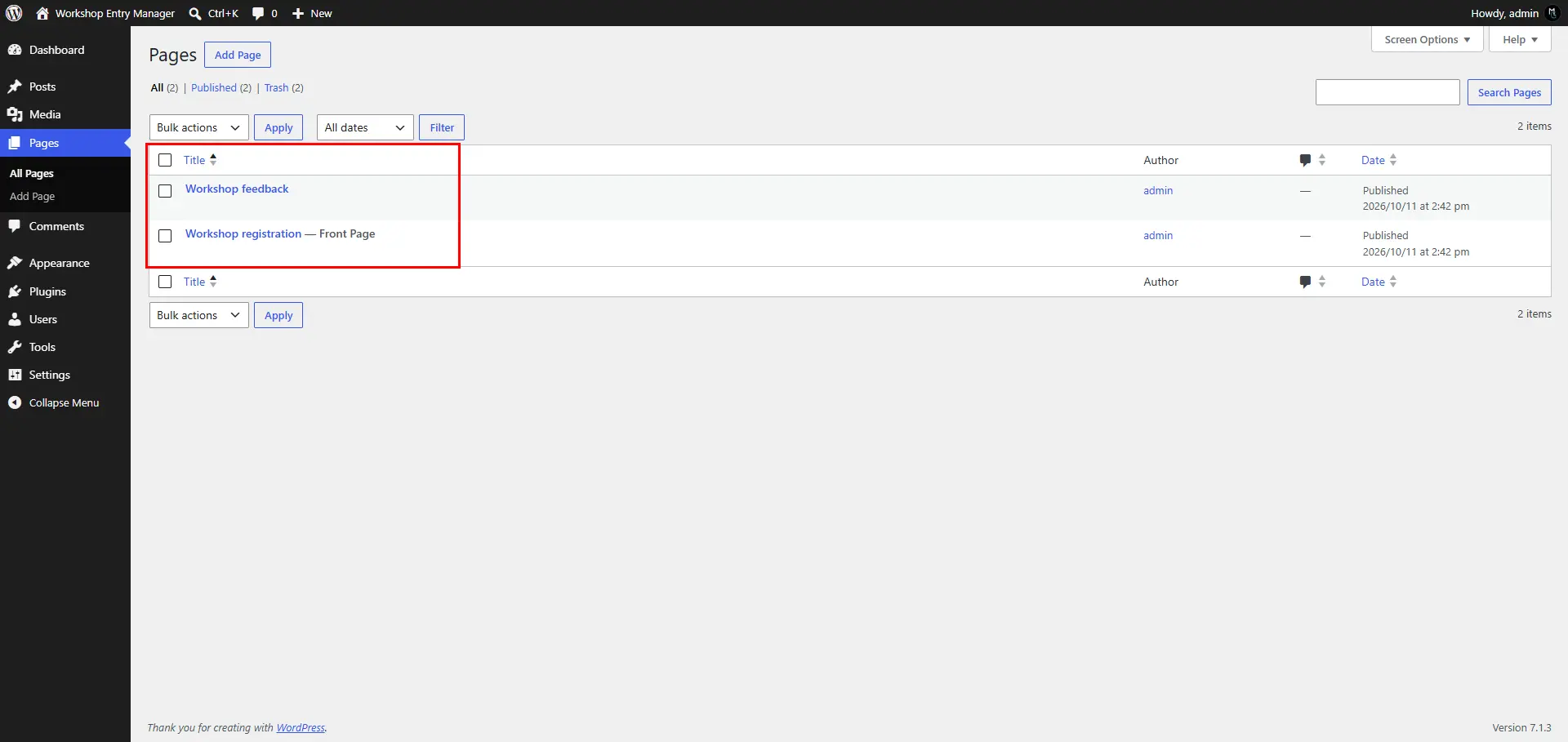
The function creates Workshop registration and Workshop feedback as published WordPress pages. Each page contains a native Shortcode block with the matching shortcode. The rendering callbacks and form actions are already registered in the same plugin file.
The generated page IDs are saved in the wem_form_pages option, and each page is marked with _wem_form_kind metadata. On reactivation, the function recognises its existing pages and leaves their content and status alone. It does not overwrite an unrelated page with the same title or slug; WordPress can give the new page a unique slug when needed.
If a tracked page was deleted or moved to Trash, reactivation creates a replacement. Each successful creation is saved immediately, so a later failure can be retried without recreating the first page. Check the actual links in Pages or the admin screens instead of assuming fixed URLs.
Activation publishes these two form pages immediately, so install on staging first and review their wording, privacy details, and caching rules before deploying. An administrator can edit the page content, but must keep the form shortcode if the form is still needed. If updating an older installation, deactivate and reactivate once to run the page setup.
The basic forms and actions are ready without manual wiring. The plugin does not add pages to your navigation menu or change your existing pages. Deactivation hides the forms because their shortcodes are no longer registered, but it does not delete the pages or their saved records.
Section 4 Render registration and feedback forms
One renderer handles the shared name and email fields, then adds feedback and photo fields only for the feedback form.
// Section 4: Render the two public forms.
function wem_form( $kind ) {
    $feedback = 'feedback' === $kind;
    $id = wp_unique_id( 'wem-' );
    ob_start();
    ?>
    <form method="post" enctype="multipart/form-data"
        action="<?php echo esc_url( admin_url( 'admin-post.php' ) ); ?>">
        <input type="hidden" name="action" value="wem_submit">
        <input type="hidden" name="kind" value="<?php echo esc_attr( $kind ); ?>">
        <?php wp_nonce_field( 'wem_submit_' . $kind, 'wem_nonce' ); ?>
        <p><label for="<?php echo esc_attr( $id . 'name' ); ?>">Name</label><br>
            <input id="<?php echo esc_attr( $id . 'name' ); ?>"
                name="name" type="text" maxlength="100" required></p>
        <p><label for="<?php echo esc_attr( $id . 'email' ); ?>">Email</label><br>
            <input id="<?php echo esc_attr( $id . 'email' ); ?>"
                name="email" type="email" maxlength="254" required></p>
        <?php if ( $feedback ) : ?>
            <p><label for="<?php echo esc_attr( $id . 'message' ); ?>">Feedback</label><br>
                <textarea id="<?php echo esc_attr( $id . 'message' ); ?>"
                    name="message" rows="5" maxlength="5000" required></textarea></p>
            <p><label for="<?php echo esc_attr( $id . 'photo' ); ?>">Photo</label><br>
                <input id="<?php echo esc_attr( $id . 'photo' ); ?>"
                    name="wem_photo" type="file" accept="image/jpeg,image/png" required></p>
            <p>JPEG or PNG only. Maximum 2 MB and 12 million pixels.</p>
            <p><label><input type="checkbox" name="photo_consent" value="1" required>
                I may share this photo and understand it will have a publicly
                accessible media URL. I have removed any sensitive metadata.</label></p>
        <?php endif; ?>
        <p><label><input type="checkbox" name="data_consent" value="1" required>
            I agree that the workshop organiser may use this submission
            to manage this workshop.</label></p>
        <p><button type="submit">Submit <?php echo esc_html( $kind ); ?></button></p>
    </form>
    <?php
    return ob_get_clean();
}
add_shortcode( 'workshop_registration', function () { return wem_form( 'registration' ); } );
add_shortcode( 'workshop_feedback', function () { return wem_form( 'feedback' ); } );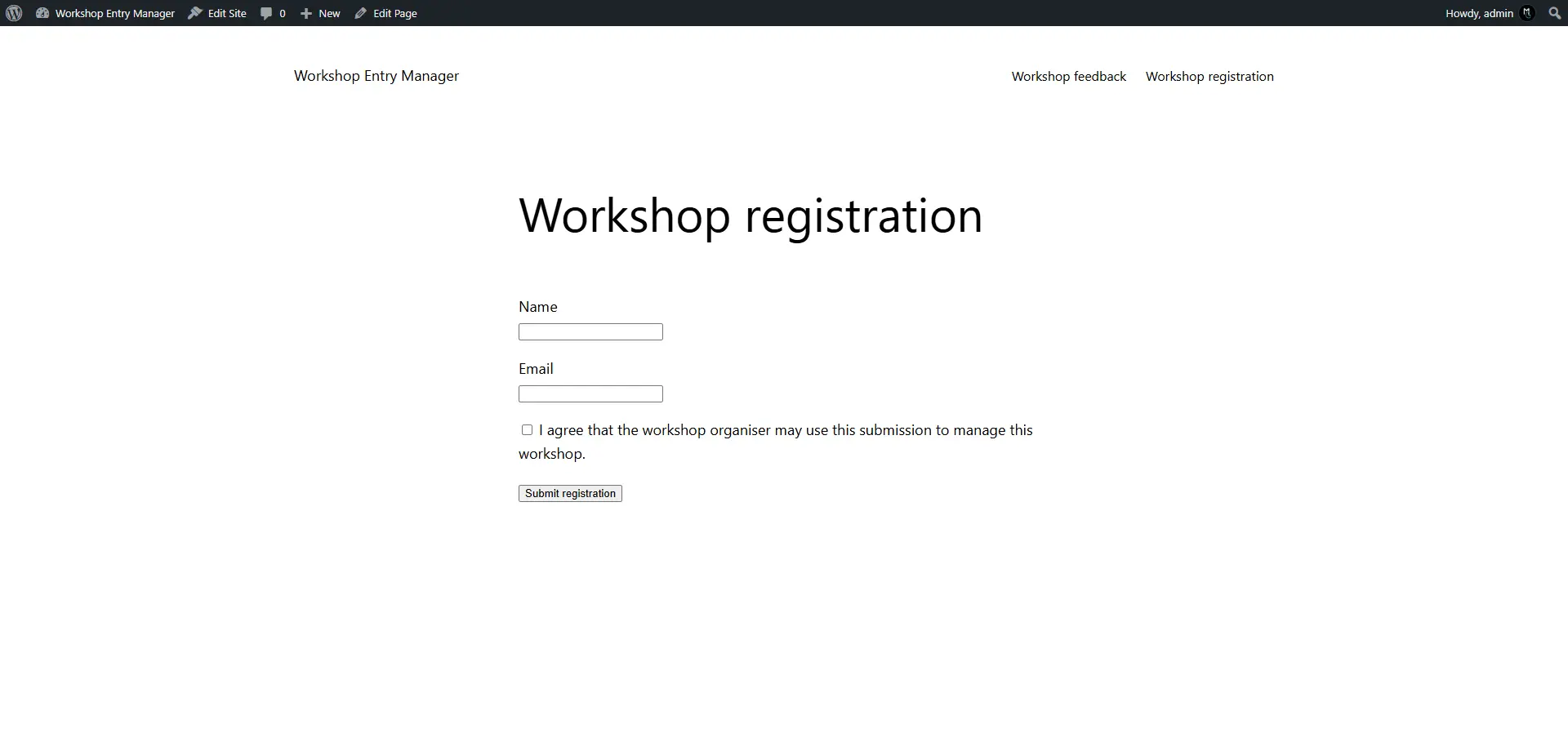
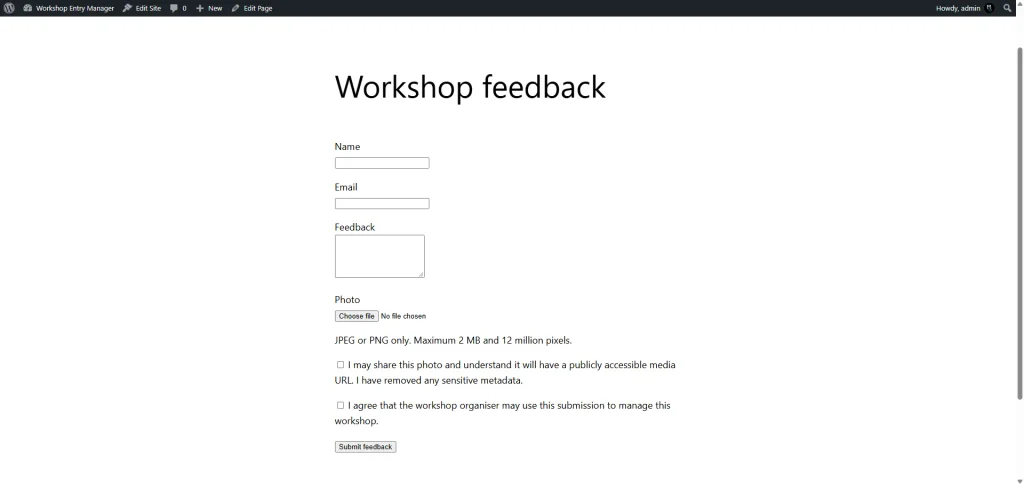
The hidden kind field distinguishes the two submissions. Each form includes a nonce tied to its kind. A unique HTML ID prefix keeps labels connected to the correct fields even if both shortcodes appear on the same page.
multipart/form-data allows the photo to reach PHP through $_FILES. The browser file picker accepts JPEG and PNG, but the server will verify the upload separately. Required checkboxes capture the sample data-use and public-photo acknowledgements; adapt the wording to the project’s actual privacy policy.
Section 5 Read scalar input and throttle repeated requests
A small input helper rejects array-shaped values before we sanitize strings. The throttle limits repeated requests from the server-visible address.
// Section 5: Read scalar input and limit repeated requests.
function wem_input( $key ) {
    return isset( $_POST[ $key ] ) && is_string( $_POST[ $key ] )
        ? wp_unslash( $_POST[ $key ] ) : '';
}

function wem_rate_allowed() {
    $address = $_SERVER['REMOTE_ADDR'] ?? '';
    if ( ! is_string( $address ) || ! filter_var( $address, FILTER_VALIDATE_IP ) ) {
        return false;
    }
    $key = 'wem_rate_' . hash_hmac( 'sha256', $address, wp_salt( 'nonce' ) );
    $count = (int) get_transient( $key );
    if ( $count >= 10 ) {
        return false;
    }
    set_transient( $key, $count + 1, 10 * MINUTE_IN_SECONDS );
    return true;
}
WordPress request values are slashed, so wem_input() unslashes them once. It returns an empty string for missing values or nested arrays. Individual fields are sanitized and validated in the submission handler.
The transient key uses an HMAC of the connection address with a WordPress salt, and the plugin does not add raw IP addresses to its entry tables. The counter is temporary and approximate. It is not atomic, shared networks may hit the same limit, and reverse proxies can make unrelated users appear to share an address.
Guest WordPress nonces are not individual identity tokens and do not stop bots. Public forms cannot use an administrator capability check because visitors are supposed to submit. Use additional site-level anti-spam controls for a live event.
Section 6 Validate the feedback photo and use WordPress media handling
Validate the temporary upload before moving it into media storage.
// Section 6: Validate and upload a feedback photo.
function wem_upload_photo() {
    if ( ! isset( $_FILES['wem_photo'] ) || ! is_array( $_FILES['wem_photo'] ) ) {
        return new WP_Error( 'wem_photo', 'Please upload a photo.' );
    }
    $file = $_FILES['wem_photo'];
    foreach ( array( 'name', 'tmp_name', 'error', 'size' ) as $key ) {
        if ( ! isset( $file[ $key ] ) || ! is_scalar( $file[ $key ] ) ) {
            return new WP_Error( 'wem_photo', 'Invalid upload request.' );
        }
    }
    if ( UPLOAD_ERR_OK !== (int) $file['error'] ||
        ! is_uploaded_file( $file['tmp_name'] ) ) {
        return new WP_Error( 'wem_photo', 'The photo upload failed.' );
    }
    $bytes = filesize( $file['tmp_name'] );
    if ( false === $bytes || $bytes < 1 || $bytes > 2 * MB_IN_BYTES ) {
        return new WP_Error( 'wem_photo', 'The photo must be no larger than 2 MB.' );
    }
    require_once ABSPATH . 'wp-admin/includes/file.php';
    require_once ABSPATH . 'wp-admin/includes/media.php';
    require_once ABSPATH . 'wp-admin/includes/image.php';
    $mimes = array( 'jpg|jpeg' => 'image/jpeg', 'png' => 'image/png' );
    $type = wp_check_filetype_and_ext( $file['tmp_name'], $file['name'], $mimes );
    $size = wp_getimagesize( $file['tmp_name'] );
    if ( empty( $type['ext'] ) || empty( $type['type'] ) || ! $size ||
        ! in_array( $size['mime'] ?? '', array_values( $mimes ), true ) ||
        $size[0] * $size[1] > 12000000 ) {
        return new WP_Error( 'wem_photo', 'Upload a valid JPEG or PNG within the pixel limit.' );
    }
    // Avoid retaining a submitter's original filename in the public URL.
    $_FILES['wem_photo']['name'] = 'workshop-' . wp_generate_uuid4() . '.' . $type['ext'];
    $photo_id = media_handle_upload(
        'wem_photo',
        0,
        array( 'post_title' => 'Workshop photo', 'post_content' => '', 'post_excerpt' => '' ),
        array( 'test_form' => false, 'mimes' => $mimes )
    );
    if ( is_wp_error( $photo_id ) ) {
        return new WP_Error( 'wem_photo', 'The photo could not be stored.' );
    }
    delete_post_meta( $photo_id, '_wp_attachment_image_alt' );
    return $photo_id;
}
The handler rejects upload errors and verifies that the temporary file came from PHP’s upload mechanism. It checks actual file size, allowed extension and MIME information, image dimensions, and the JPEG/PNG allow-list. Large pixel dimensions can use substantial memory even when a file is small.
The original filename is replaced with a generic UUID-based name. media_handle_upload() then moves the file, creates the attachment, and generates image metadata and sizes through WordPress. The feedback table stores the returned attachment ID.
The sample explicitly allows public visitors to submit only these validated images. It does not grant them general Media Library permissions. WordPress media handling can still fail or time out; monitor capacity and clean up orphaned attachments if a request ends between file creation and saving its row.
Section 7 Validate and save each submission
The same request handler routes each form to its own table. It never checks the other table as a prerequisite.
// Section 7: Save each form into its own table.
function wem_submit() {
    if ( 'POST' !== ( $_SERVER['REQUEST_METHOD'] ?? '' ) ) {
        wp_die( 'Please submit the form.', '', array( 'response' => 405 ) );
    }
    $kind = wem_input( 'kind' );
    if ( ! in_array( $kind, array( 'registration', 'feedback' ), true ) ) {
        wp_die( 'Invalid form.' );
    }
    if ( ! wp_verify_nonce( wem_input( 'wem_nonce' ), 'wem_submit_' . $kind ) ) {
        wp_die( 'The form expired. Reload the form page and try again.' );
    }
    if ( ! wem_rate_allowed() ) {
        wp_die( 'Too many requests. Please try again later.', '', array( 'response' => 429 ) );
    }
    $name = sanitize_text_field( wem_input( 'name' ) );
    $email = strtolower( sanitize_email( wem_input( 'email' ) ) );
    $message = sanitize_textarea_field( wem_input( 'message' ) );
    if ( '' === $name || strlen( $name ) > 100 || ! is_email( $email ) ||
        strlen( $email ) > 254 || '1' !== wem_input( 'data_consent' ) ||
        ( 'feedback' === $kind && ( '' === $message || strlen( $message ) > 5000 ||
            '1' !== wem_input( 'photo_consent' ) ) ) ) {
        wp_die( 'Please complete the required fields and consent checkboxes.' );
    }
    global $wpdb;
    $table = wem_table( $kind );
    $existing = $wpdb->get_var( $wpdb->prepare(
        'SELECT id FROM %i WHERE email = %s LIMIT 1', $table, $email
    ) );
    if ( $wpdb->last_error ) {
        wp_die( 'Entries could not be checked. Please try again later.' );
    }
    if ( $existing ) {
        wp_die( 'This email already has an entry for this form.' );
    }
    $data = array( 'name' => $name, 'email' => $email, 'created_at' => current_time( 'mysql', true ) );
    $formats = array( '%s', '%s', '%s' );
    $photo_id = 0;
    if ( 'feedback' === $kind ) {
        $photo_id = wem_upload_photo();
        if ( is_wp_error( $photo_id ) ) {
            wp_die( esc_html( $photo_id->get_error_message() ) );
        }
        $data['message'] = $message;
        $data['photo_id'] = $photo_id;
        $formats[] = '%s';
        $formats[] = '%d';
    }
    if ( false === $wpdb->insert( $table, $data, $formats ) ) {
        if ( $photo_id ) {
            wp_delete_attachment( $photo_id, true );
        }
        wp_die( 'The entry could not be saved, or this email already has an entry.' );
    }
    // POST then GET prevents an ordinary result-page refresh repeating the upload.
    wp_safe_redirect( add_query_arg( 'action', 'wem_received', admin_url( 'admin-post.php' ) ), 303 );
    exit;
}
add_action( 'admin_post_wem_submit', 'wem_submit' );
add_action( 'admin_post_nopriv_wem_submit', 'wem_submit' );

function wem_received() {
    wp_die( 'Thank you. Your submission has been received.', 'Submission received', array( 'response' => 200 ) );
}
add_action( 'admin_post_wem_received', 'wem_received' );
add_action( 'admin_post_nopriv_wem_received', 'wem_received' );
First it verifies the request method, allow-listed kind, nonce, and throttle. It then sanitizes and validates the fields. Name and message length checks use bytes and are conservative for multibyte input. Browser validation helps the visitor, but these server checks are the actual boundary.
The duplicate lookup is prepared and scoped to the selected table. For registration, the insert contains name, email, and UTC time. For feedback, we upload the photo first and add the message and attachment ID to that insert.
$wpdb->insert() takes formats in the same order as the data array. If the insert fails after an upload, the handler attempts to delete the newly created attachment. File creation and database insertion are not one transaction, so an interrupted request can still leave an orphan that needs cleanup.
A 303 redirect sends successful submissions to a simple receipt page. Ordinary refreshes do not repeat the POST. Failed requests show a message and the visitor can return to the form; a richer interface could preserve safe values and add inline validation later.
Both logged-in and guest handlers are registered because these are public forms. Admin permissions come into play when reading records, downloading CSV, or selecting winners. No email notifications or email ownership verification are included.
Section 8 Retrieve records and add admin screens
Use bounded queries and separate admin pages for the two datasets.
// Section 8: Retrieve bounded pages and register admin screens.
function wem_rows( $kind, $page = 1 ) {
    global $wpdb;
    $offset = ( max( 1, absint( $page ) ) - 1 ) * 20;
    $columns = 'feedback' === $kind
        ? 'id, name, email, message, photo_id, is_winner, created_at'
        : 'id, name, email, created_at';
    $rows = $wpdb->get_results( $wpdb->prepare(
        "SELECT {$columns} FROM %i ORDER BY id DESC LIMIT 21 OFFSET %d",
        wem_table( $kind ), $offset
    ), ARRAY_A );
    return $wpdb->last_error || ! is_array( $rows )
        ? new WP_Error( 'wem_read', 'Entries could not be loaded.' ) : $rows;
}

function wem_admin_menu() {
    add_management_page( 'Workshop registrations', 'Workshop registrations',
        'manage_options', 'wem-registration', function () { wem_admin_page( 'registration' ); } );
    add_management_page( 'Workshop feedback', 'Workshop feedback',
        'manage_options', 'wem-feedback', function () { wem_admin_page( 'feedback' ); } );
}
add_action( 'admin_menu', 'wem_admin_menu' );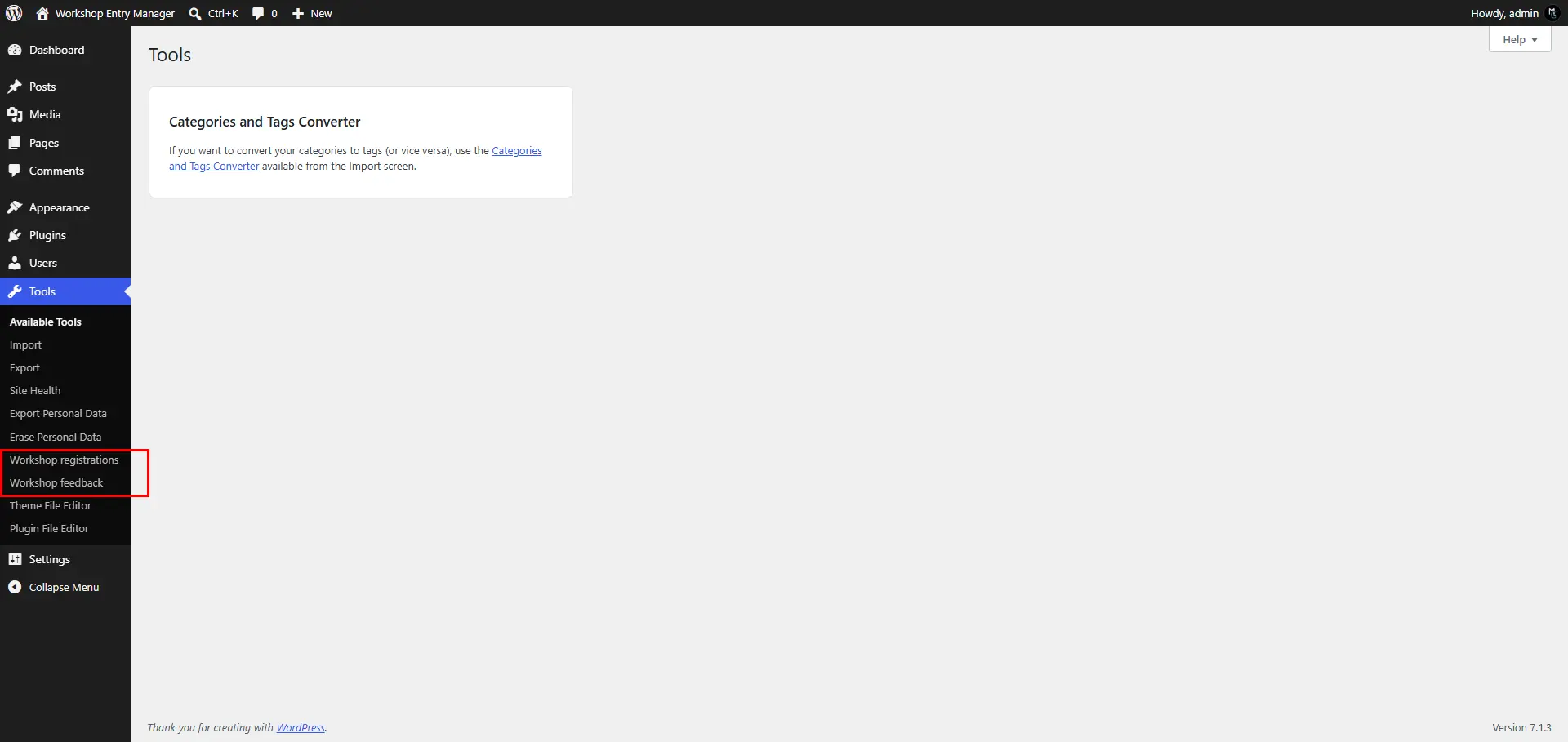
The selected column list comes from code-controlled values. The table uses a %i identifier placeholder and the offset uses %d. These are prepared query arguments, not concatenated visitor input.
The query requests 21 records to display 20 and determine whether another page exists. It orders by the primary key, so no extra creation-time index is needed for this list. It returns WP_Error on a read failure rather than making failure look like an empty table.
The pages appear under Tools and require manage_options, which administrators normally have. A real event team may need its own role and capability rather than broad access to site settings.
Section 9 Show submissions and the winner controls
The admin screen displays escaped text, photo thumbnails, and separate export links.
// Section 9: Display records and the five-winner controls.
function wem_admin_page( $kind ) {
    if ( ! current_user_can( 'manage_options' ) ) {
        wp_die( 'You are not allowed to view these entries.' );
    }
    $page = isset( $_GET['entry_page'] ) && is_string( $_GET['entry_page'] )
        ? max( 1, absint( $_GET['entry_page'] ) ) : 1;
    $rows = wem_rows( $kind, $page );
    if ( is_wp_error( $rows ) ) {
        wp_die( esc_html( $rows->get_error_message() ) );
    }
    $next = count( $rows ) > 20;
    $rows = array_slice( $rows, 0, 20 );
    echo '<div class="wrap"><h1>Workshop ' . esc_html( $kind ) . ' entries</h1>';
    $pages = get_option( 'wem_form_pages', array() );
    $page_id = is_array( $pages ) ? absint( $pages[ $kind ] ?? 0 ) : 0;
    if ( $page_id && 'publish' === get_post_status( $page_id ) ) {
        echo '<p><a class="button" href="' . esc_url( get_permalink( $page_id ) ) . '">Open form page</a></p>';
    }
    $url = wp_nonce_url( add_query_arg( array( 'action' => 'wem_export', 'kind' => $kind ),
        admin_url( 'admin-post.php' ) ), 'wem_export_' . $kind );
    echo '<p><a class="button" href="' . esc_url( $url ) . '">Download CSV</a></p>';
    echo '<table class="widefat striped"><thead><tr>';
    $headings = array( 'ID', 'Name', 'Email', 'Created UTC' );
    if ( 'feedback' === $kind ) {
        $headings = array_merge( $headings, array( 'Feedback', 'Photo', 'Winner' ) );
    }
    foreach ( $headings as $heading ) {
        echo '<th scope="col">' . esc_html( $heading ) . '</th>';
    }
    echo '</tr></thead><tbody>';
    foreach ( $rows as $row ) {
        echo '<tr>';
        foreach ( array( 'id', 'name', 'email', 'created_at' ) as $key ) {
            echo '<td>' . esc_html( $row[ $key ] ) . '</td>';
        }
        if ( 'feedback' === $kind ) {
            echo '<td>' . esc_html( $row['message'] ) . '</td><td>';
            $photo_url = wp_get_attachment_url( $row['photo_id'] );
            if ( $photo_url ) {
                echo '<a href="' . esc_url( $photo_url ) . '" target="_blank" rel="noopener noreferrer">';
                echo wp_get_attachment_image( $row['photo_id'], array( 80, 80 ), false, array( 'alt' => 'Submitted workshop photo' ) );
                echo '</a>';
            } else {
                echo 'Photo unavailable';
            }
            echo '</td><td>' . ( $row['is_winner'] ? 'Yes' : 'No' ) . '</td>';
        }
        echo '</tr>';
    }
    if ( ! $rows ) {
        echo '<tr><td colspan="' . esc_attr( count( $headings ) ) . '">No entries found.</td></tr>';
    }
    echo '</tbody></table><p>';
    foreach ( array( 'Previous' => $page - 1, 'Next' => $next ? $page + 1 : 0 ) as $label => $number ) {
        if ( $number > 0 ) {
            $url = add_query_arg( array( 'page' => 'wem-' . $kind, 'entry_page' => $number ), admin_url( 'tools.php' ) );
            echo '<a class="button" href="' . esc_url( $url ) . '">' . esc_html( $label ) . '</a> ';
        }
    }
    echo '</p>';
    if ( 'feedback' === $kind ) {
        wem_winner_form();
    }
    echo '</div>';
}

function wem_winner_form() {
    global $wpdb;
    $ids = $wpdb->get_col( $wpdb->prepare(
        'SELECT id FROM %i WHERE is_winner = 1 ORDER BY id ASC LIMIT 5', wem_table( 'feedback' )
    ) );
    if ( $wpdb->last_error ) {
        echo '<p>Winner selection could not be loaded.</p>';
        return;
    }
    echo '<h2>Select exactly five winners</h2><p>Review the photos and enter five different feedback entry IDs. IDs may come from any page.</p>';
    echo '<form method="post" action="' . esc_url( admin_url( 'admin-post.php' ) ) . '">';
    echo '<input type="hidden" name="action" value="wem_save_winners">';
    wp_nonce_field( 'wem_save_winners' );
    for ( $i = 0; $i < 5; $i++ ) {
        echo '<p><label>Winner ' . esc_html( $i + 1 ) . ' entry ID ';
        echo '<input type="number" name="winner_ids[]" min="1" required value="';
        echo esc_attr( $ids[ $i ] ?? '' ) . '"></label></p>';
    }
    submit_button( 'Save five winners' );
    echo '</form>';
}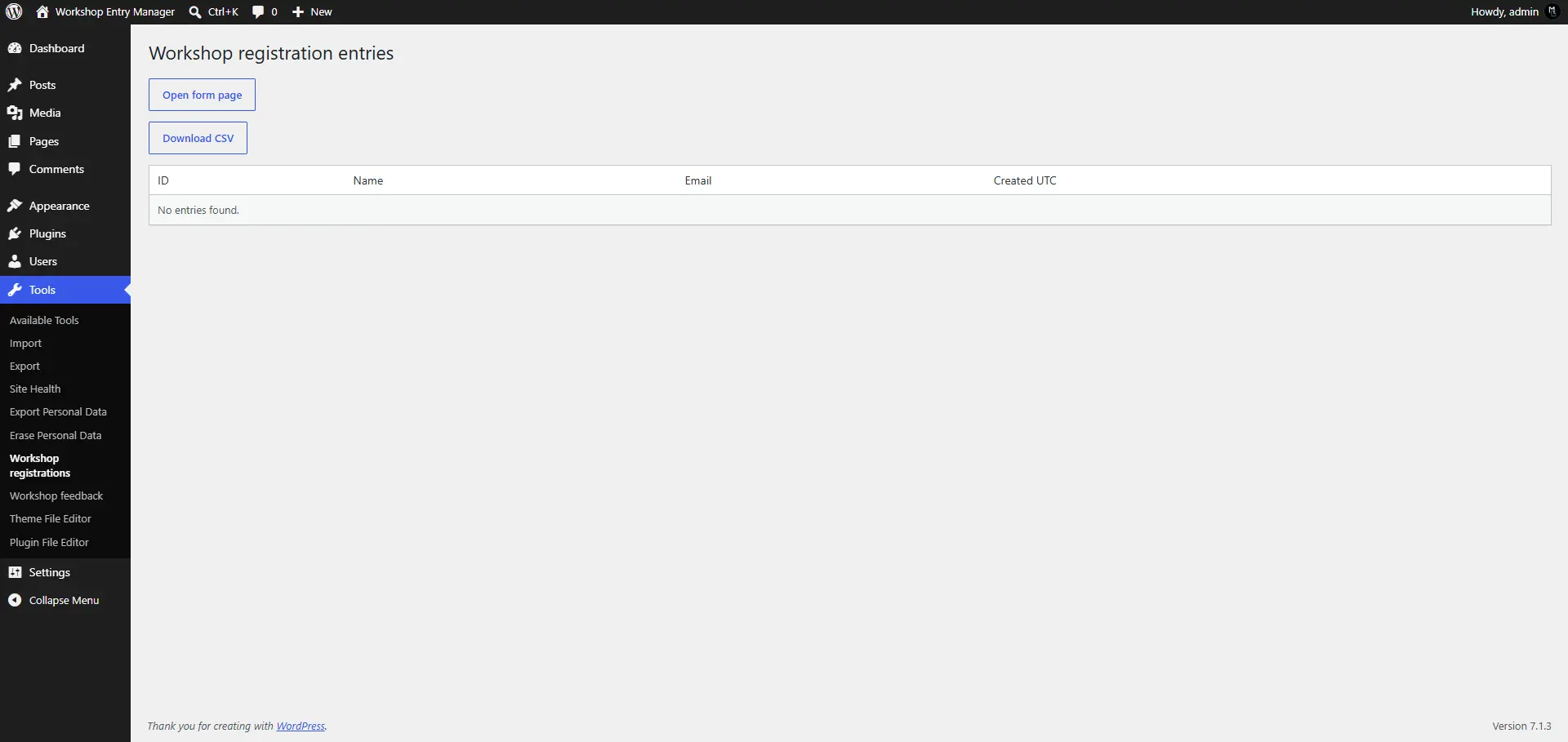
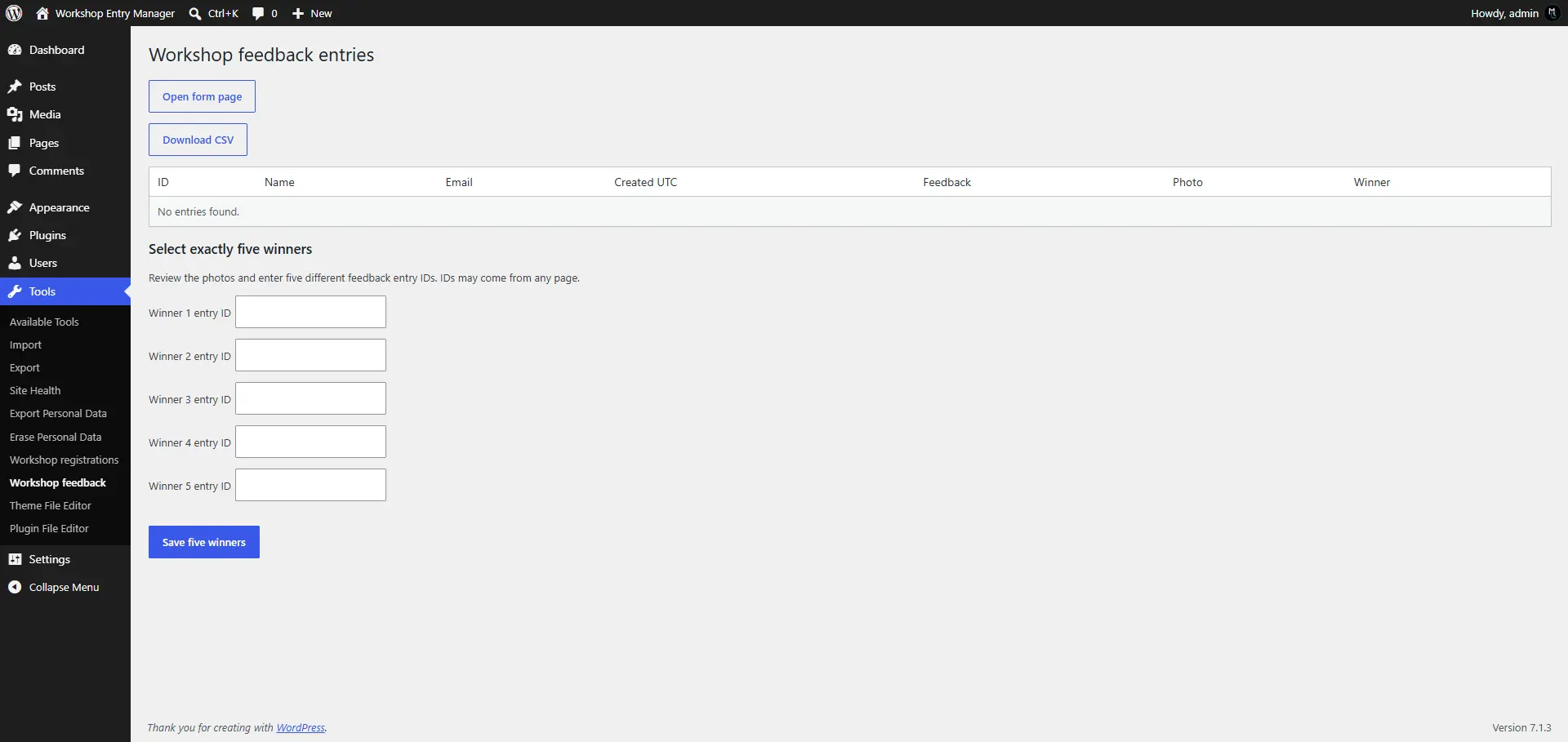
Registration data is shared with administrators through its protected list and CSV download. Feedback has its own list, with photo previews and winner flags. Stored names, emails, messages, and times are escaped as text; links use URL escaping.
Winner selection uses five entry-ID fields below the feedback list. This keeps the single-file version simple and lets an admin choose entries from different pages without losing hidden checkbox selections. The current winners are loaded into those fields.
The administrator reviews the photos, notes the five feedback IDs, and saves them. A visual checkbox or shortlist interface could be added later. It would still need the same server-side validation in the next section.
Section 10 Save exactly five valid winners
Validate the entire selection before changing any winner flags.
// Section 10: Validate all five winners and replace the selection in one query.
function wem_save_winners() {
    if ( ! current_user_can( 'manage_options' ) ) {
        wp_die( 'You are not allowed to choose winners.' );
    }
    if ( 'POST' !== ( $_SERVER['REQUEST_METHOD'] ?? '' ) ) {
        wp_die( 'Please use the winner selection form.' );
    }
    check_admin_referer( 'wem_save_winners' );
    $raw = $_POST['winner_ids'] ?? array();
    if ( ! is_array( $raw ) || count( $raw ) !== 5 ) {
        wp_die( 'Choose exactly five winners.' );
    }
    $ids = array();
    foreach ( $raw as $value ) {
        if ( ! is_string( $value ) || ! ctype_digit( $value ) || (int) $value < 1 ) {
            wp_die( 'Each winner ID must be a positive integer.' );
        }
        $ids[] = (int) $value;
    }
    if ( count( array_unique( $ids ) ) !== 5 ) {
        wp_die( 'Choose five different entries.' );
    }
    global $wpdb;
    $args = array_merge( array( wem_table( 'feedback' ) ), $ids );
    $found = $wpdb->get_col( $wpdb->prepare(
        'SELECT id FROM %i WHERE id IN (%d, %d, %d, %d, %d)', $args
    ) );
    if ( $wpdb->last_error || count( $found ) !== 5 ) {
        wp_die( 'All five IDs must belong to existing feedback entries.' );
    }
    $saved = $wpdb->query( $wpdb->prepare(
        'UPDATE %i SET is_winner = CASE WHEN id IN (%d, %d, %d, %d, %d) THEN 1 ELSE 0 END', $args
    ) );
    if ( false === $saved ) {
        wp_die( 'Winners could not be saved. The previous selection was not deliberately cleared first.' );
    }
    wp_safe_redirect( admin_url( 'tools.php?page=wem-feedback' ), 303 );
    exit;
}
add_action( 'admin_post_wem_save_winners', 'wem_save_winners' );
The handler checks the administrator capability and nonce. It rejects anything other than five positive, distinct IDs, then queries the feedback table to confirm that all five records exist. Invalid selections leave the existing flags unchanged.
One UPDATE uses CASE to set those five rows to 1 and the other feedback rows to 0. This avoids clearing the selection in one query and then writing winners through five separate calls. Registration rows are never touched.
A zero-row change is still a successful query when the same winners were already selected, which is why the error check is strict false. The example assumes ordinary WordPress table behaviour and no concurrent external row deletion. For strict transaction guarantees, use a transactional engine and design the locking and conflict behaviour explicitly.
There is one workshop and one winner set. A later authorised save replaces that set; it does not create a second round. If two admins save different selections, the later successful save takes effect. Larger judging systems need rounds, audit history, and clearer conflict handling.
Section 11 Export the data without public temporary files
The final handler streams each dataset as a CSV download for authorised administrators.
// Section 11: Export authorised CSV without public temporary files.
function wem_csv_cell( $value ) {
    $value = (string) $value;
    return preg_match( '/^[\x00-\x20]*[=+@-]/', $value ) || preg_match( '/^[\t\r\n]/', $value )
        ? "'" . $value : $value;
}

function wem_export() {
    if ( ! current_user_can( 'manage_options' ) ) {
        wp_die( 'You are not allowed to export these entries.' );
    }
    $kind = isset( $_GET['kind'] ) && is_string( $_GET['kind'] ) ? wp_unslash( $_GET['kind'] ) : '';
    if ( ! in_array( $kind, array( 'registration', 'feedback' ), true ) ) {
        wp_die( 'Invalid export type.' );
    }
    check_admin_referer( 'wem_export_' . $kind );
    global $wpdb;
    $columns = 'feedback' === $kind
        ? array( 'id', 'name', 'email', 'created_at', 'message', 'photo_id', 'is_winner' )
        : array( 'id', 'name', 'email', 'created_at' );
    $fields = implode( ', ', $columns );
    $last_id = 0;
    $query = 'SELECT ' . $fields . ' FROM %i WHERE id > %d ORDER BY id ASC LIMIT 200';
    $rows = $wpdb->get_results( $wpdb->prepare( $query, wem_table( $kind ), $last_id ), ARRAY_A );
    if ( $wpdb->last_error || ! is_array( $rows ) ) {
        wp_die( 'Export could not be started.' );
    }
    $stream = fopen( 'php://output', 'w' );
    if ( ! $stream ) {
        wp_die( 'Export output could not be opened.' );
    }
    nocache_headers();
    header( 'Content-Type: text/csv; charset=utf-8' );
    header( 'Content-Disposition: attachment; filename="workshop-' . $kind . '.csv"' );
    fputcsv( $stream, $columns, ',', '"', '' );
    while ( $rows ) {
        foreach ( $rows as $row ) {
            fputcsv( $stream, array_map( 'wem_csv_cell', $row ), ',', '"', '' );
            $last_id = (int) $row['id'];
        }
        $rows = $wpdb->get_results( $wpdb->prepare( $query, wem_table( $kind ), $last_id ), ARRAY_A );
        if ( $wpdb->last_error || ! is_array( $rows ) ) {
            // Abort the download rather than quietly calling a partial export complete.
            wp_die( 'Export interrupted. Discard this download and retry.' );
        }
    }
    fclose( $stream );
    exit;
}
add_action( 'admin_post_wem_export', 'wem_export' );
The export type is allow-listed and its nonce is checked after the capability check. It reads 200 rows at a time by increasing ID and streams them directly instead of saving a temporary CSV under a public uploads directory.
User text can be interpreted as a spreadsheet formula when a CSV is opened. wem_csv_cell() prefixes potentially dangerous starting characters, including whitespace-prefixed formulas, with an apostrophe. Keep this mitigation when exporting form data.
Feedback exports include attachment IDs and winner flags, not a ZIP of the photos. This keeps the example smaller and avoids creating a public image archive. Exports are not a point-in-time snapshot while submissions or winner edits continue, and they still need careful handling because they contain personal data.
Install the complete plugin and test the workflow
Download workshop-entry-manager.zip from this article’s resources and install it through Plugins > Add New > Upload Plugin. For manual installation, create workshop-entry-manager inside wp-content/plugins, place workshop-entry-manager.php inside that folder, then activate Workshop Entry Manager. Do not leave the PHP file loose in the plugins directory for this example.
Activation automatically creates and publishes Workshop registration and Workshop feedback with their form shortcodes. Open them from the WordPress Pages list or the Open form page links in the two admin screens. No manual page creation or action setup is required. Submit a registration on local or staging, then view it under Tools > Workshop registrations. Download its CSV and confirm the values.
Next, submit feedback with a valid test photo. Use an email that is not present in registrations and confirm that feedback still succeeds. Also use one email once on each form to confirm their independence. A second submission to the same form should be rejected.
Submit at least five feedback records. Review them in Tools > Workshop feedback, enter five different feedback IDs, and save. Confirm exactly those rows show Yes. Test four IDs, duplicate IDs, and a nonexistent ID; all should fail without changing the saved selection.
Also test invalid email values, missing consent, expired nonces, array-shaped fields, oversized files, invalid image content, and users without admin access. Verify the tables’ unique indexes and test deactivation and reactivation with existing records. An ordinary browser refresh after a successful submit should not add another row.
PHP syntax and isolated helper tests do not verify activation, actual database behaviour, media processing, or browser submissions. Those checks need a disposable WordPress installation before the plugin is used for a live event.
Best practices and common mistakes
Start by checking whether a reliable plugin or a WordPress content model already supports the workflow. If you own the storage, keep the table structure tied to the actual records and queries. Do not join independent datasets just because both contain an email address.
Enforce uniqueness in the database, validate before saving, prepare dynamic queries, and escape output. Treat uploads as a separate failure path. A valid nonce does not validate an image, a random filename does not make it private, and a hidden form field is not trusted routing data.
Document retention and cleanup. This plugin preserves its generated pages, tables, and media on deactivation or deletion. It does not supply a privacy export/erasure integration or entry deletion screen. If you add those, design how a feedback row and its photo are removed together.
Back up both the database and uploads. Check that migrations include the custom tables. Never change production schema or clear winner data without testing the operation against existing records first.
Final thoughts
The useful part of this project was the workflow: two independent forms, clear admin access, photo review, and five saved winners. The custom tables gave those records a structure I could work with directly.
I considered existing plugins first, but the cost and gaps in the complete workflow led me to a custom plugin for this project. Keeping the pages, submission handlers, and admin tools together made the setup easier to hand over.
Have you built a form workflow where the admin’s next step mattered as much as collecting the submission? That is often where a simple form starts turning into a small application.
Frequently asked questions
Do I need a custom table for registration or feedback
Usually a suitable form or event plugin can handle those submissions. This example teaches custom storage when you are developing and maintaining a specific workflow yourself.
Why are there two tables
Registration and feedback have different fields and independent lifecycles. Feedback needs a photo and winner flag; registration does not. Keeping them separate also makes duplicate rules and admin queries easier to follow.
Does feedback require registration
No. There is no registration lookup or foreign key. The same email can submit once to each form, and feedback can also come from an email that never registered.
Are photos stored inside the custom table
No. WordPress stores the photo as a media attachment and the feedback table stores its attachment ID. Normal upload URLs are public; confidential photos need a protected delivery design.
Can an admin choose fewer than five winners
Not in this example. The server requires five different, existing feedback entry IDs and rejects an invalid selection before updating the flags.
Does registration email the admin
No. Administrators view entries in the protected WordPress list or download CSV. Email notifications can be added separately if the project needs them.
Do I need to create the form pages manually
No. Activation creates and publishes both form pages with their shortcodes. The submission handlers are already included. Existing plugin-created pages are preserved on reactivation; deleted or trashed pages are replaced.
Will uninstalling the plugin remove its data
No. The sample keeps the generated pages, both tables, and uploaded media. Forms stop rendering while the plugin is inactive. A deliberate cleanup routine should be designed separately, with backup and retention requirements in mind.
Useful resources
- Creating tables with plugins: https://developer.wordpress.org/plugins/creating-tables-with-plugins/
- wpdb insert: https://developer.wordpress.org/reference/classes/wpdb/insert/
- wpdb prepare: https://developer.wordpress.org/reference/classes/wpdb/prepare/
- wpdb get_results: https://developer.wordpress.org/reference/classes/wpdb/get_results/
- WordPress media upload handling: https://developer.wordpress.org/reference/functions/media_handle_upload/
- File type and extension checks: https://developer.wordpress.org/reference/functions/wp_check_filetype_and_ext/
- WordPress nonces: https://developer.wordpress.org/apis/security/nonces/
- Creating pages with wp_insert_post: https://developer.wordpress.org/reference/functions/wp_insert_post/
From Maya Grafix:
- Maya Grafix first plugin guide: https://mayagrafix.com/blog/how-to-create-your-first-wordpress-plugin-beginners-guide/
- Maya Grafix custom admin pages: https://mayagrafix.com/blog/custom-admin-pages-in-wordpress/
- Maya Grafix custom post types with ACF: https://mayagrafix.com/blog/custom-post-types-with-acf/