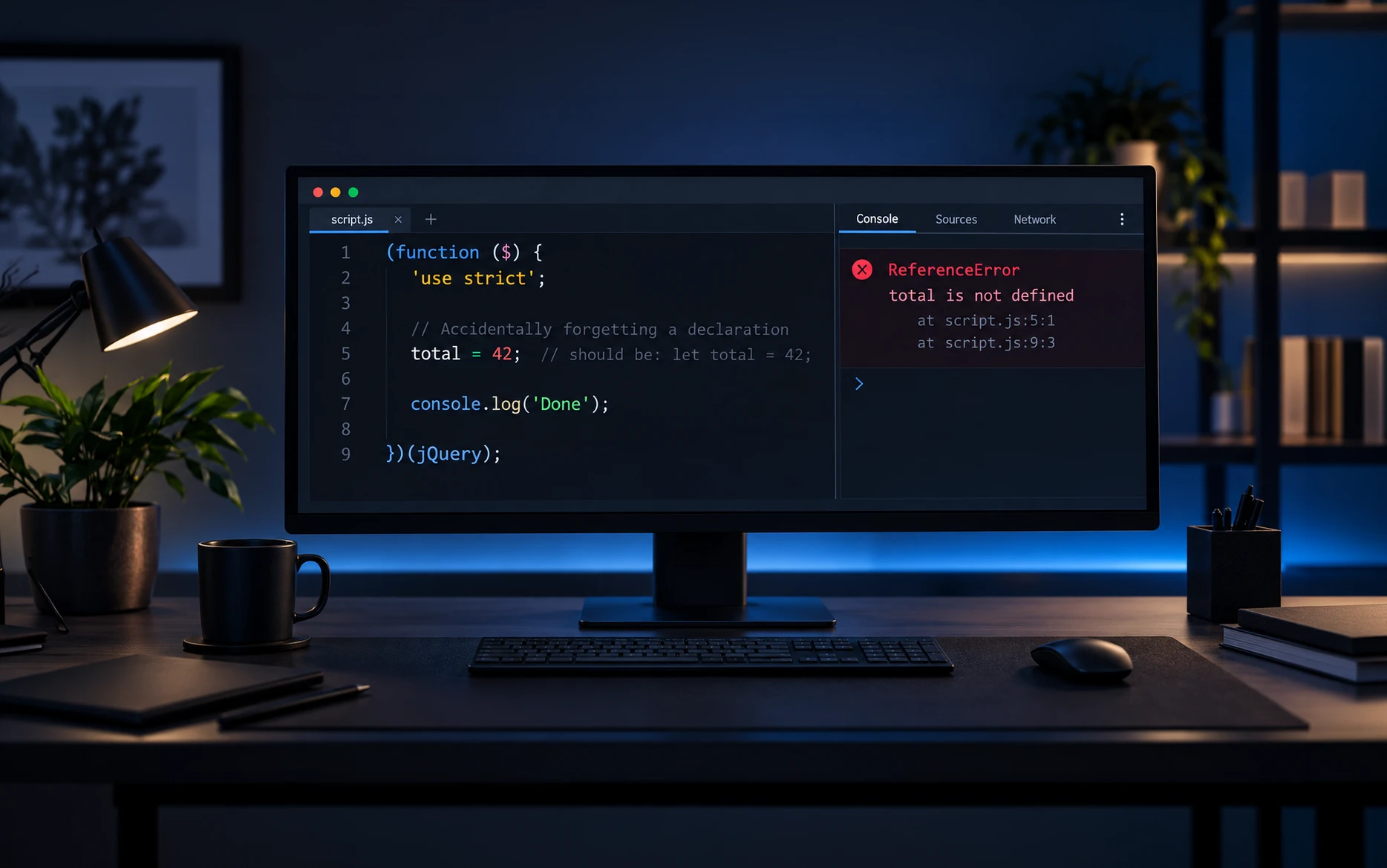
If you have spent any time inside WordPress plugins, themes, or page-builder code, you have probably seen this pattern:
(function ($) {
  "use strict";

  // jQuery code here.

})(jQuery);
The line looks as though it enables a special jQuery mode. It does not. Strict mode is part of JavaScript, and jQuery code follows it because jQuery is JavaScript.
That distinction matters. If we understand what the directive changes, we can use it deliberately instead of copying it into every file and hoping it makes the code safer.
In my experience, strict mode is most useful in traditional WordPress script files, especially when I am extending an existing jQuery-based site. It exposes several mistakes immediately, keeps old code honest, and fits neatly inside the same wrapper WordPress developers already use for jQuery noConflict mode.
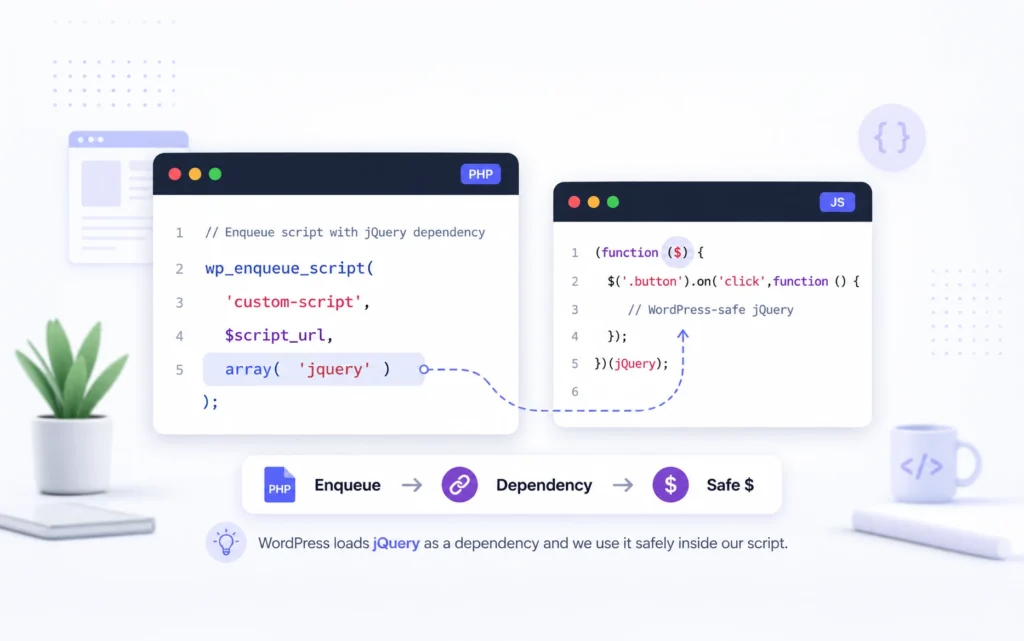
If the noConflict wrapper is new to you, read Why I Prefer jQuery in WordPress Over JavaScript first. That guide explains why $ is not normally available as a global shortcut in WordPress.
Table of Contents
The Problem with the Phrase jQuery Strict Mode
Developers search for jQuery strict mode because the directive often sits beside jQuery code. Technically, however, jQuery does not provide a strict-mode switch for your script.
The browser sees 'use strict'; as a JavaScript directive. It changes how JavaScript parses and runs the script or function that contains it. The jQuery calls inside that scope simply run under those rules.
There is one related detail worth knowing: jQuery 3.0 and later builds jQuery itself in strict mode. That describes the library’s own source code. It does not automatically make every separate script on your WordPress site strict.
Reference: jQuery Core 3.0 Upgrade Guide.
What JavaScript Strict Mode Actually Changes
Strict mode opts a script or function into a more restricted set of JavaScript rules. Its practical value is that several mistakes that might otherwise pass silently become visible errors.
The browser can then stop at the faulty line instead of allowing the mistake to create a second, harder-to-diagnose problem later. That makes strict mode particularly useful in WordPress, where one page can combine code from core, a theme, a builder, several plugins, and project-specific scripts.
MDN documents the complete behavior in its JavaScript strict mode reference. The examples below focus on the parts I find most useful in everyday WordPress work.
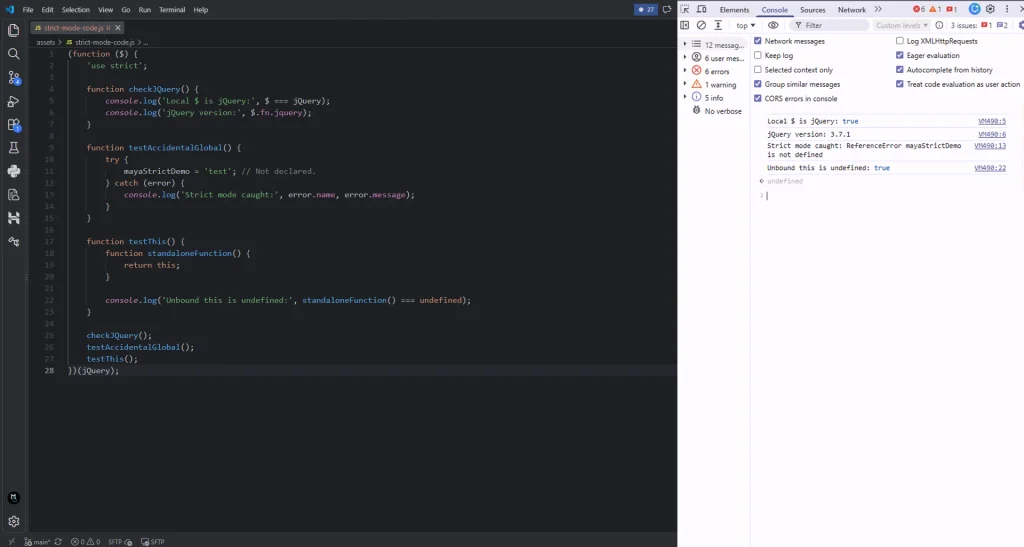
Strict Mode Stops Accidental Global Variables
An accidental global is one of the easiest JavaScript bugs to miss. It usually starts with a variable name that was never declared.
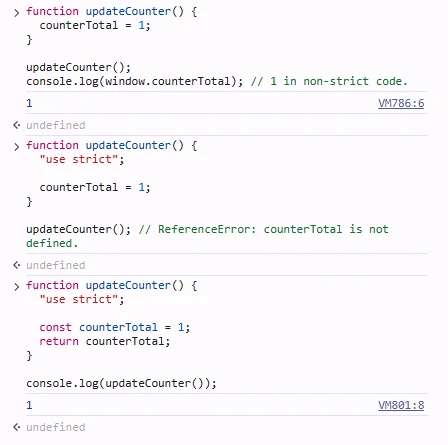
function updateCounter() {
  counterTotal = 1;
}

updateCounter();
console.log(window.counterTotal); // 1 in non-strict code.
Without strict mode, the assignment can create window.counterTotal. The function appears to work, but the value now lives in the global namespace, where another plugin or script can overwrite it.
With strict mode, the same mistake throws a ReferenceError:
function updateCounter() {
  "use strict";

  counterTotal = 1;
}

updateCounter(); // ReferenceError: counterTotal is not defined.
The fix is simple because the error points to the actual mistake:
function updateCounter() {
  "use strict";

  const counterTotal = 1;
  return counterTotal;
}

console.log(updateCounter());
This is the strict-mode behavior I value most. On a large WordPress page, a leaked global can collide with code that you do not control. Failing on the assignment gives me a useful error while I am testing.
For a practical debugging workflow, see How Chrome Developer Tools Helps Me Find and Fix Website Problems Faster. If you test small snippets directly in the Console, also read Allow Pasting Chrome Console and never paste code you have not reviewed.
Strict Mode Turns Silent Failures into Errors
Older JavaScript behavior sometimes ignores an invalid operation. The code continues, leaving us to discover later that the expected state never changed.
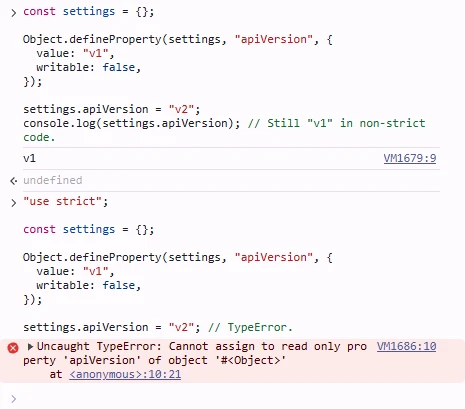
const settings = {};

Object.defineProperty(settings, "apiVersion", {
  value: "v1",
  writable: false,
});

settings.apiVersion = "v2";
console.log(settings.apiVersion); // Still "v1" in non-strict code.
Under strict mode, assigning to that read-only property throws a TypeError. That is much easier to debug than a value that quietly refuses to update.
"use strict";

const settings = {};

Object.defineProperty(settings, "apiVersion", {
  value: "v1",
  writable: false,
});

settings.apiVersion = "v2"; // TypeError.
Strict mode also rejects or throws on other questionable operations, including some attempts to delete non-deletable properties and legacy syntax that modern code should avoid. I do not memorize every rule. The benefit is the same: the browser reports the bad assumption closer to its source.
Strict Mode Changes the Value of this
The this keyword causes confusion because its value depends on how a function is called. In a normal standalone function, non-strict browser JavaScript can substitute the global object when no receiver is provided.
function showContext() {
  return this;
}

console.log(showContext() === window); // Usually true in a classic non-strict script.
In strict mode, JavaScript does not make that substitution:
function showContext() {
  "use strict";

  return this;
}

console.log(showContext()); // undefined.
This prevents an unbound function from accidentally reading or writing properties on window. It can also reveal old code that depended on the global object without saying so.
Strict mode does not change jQuery’s deliberate event-handler binding. In a traditional function passed to .on(), jQuery sets this to the element handling the event:
(function ($) {
  "use strict";

  $(".faq-button").on("click", function () {
    $(this).attr("aria-expanded", function (_, value) {
      return value !== "true";
    });
  });
})(jQuery);
Do not replace that callback with an arrow function if you expect jQuery to supply this. Arrow functions capture this from their surrounding scope; they do not receive a new value from jQuery.
Why ‘use strict'; Appears Inside a WordPress jQuery IIFE
WordPress loads its bundled jQuery in noConflict mode. That means WordPress avoids giving jQuery permanent ownership of the global $ variable, because another library may use the same name.
The standard IIFE pattern solves that problem by passing the global jQuery object into a function parameter named $:
(function ($) {
'use strict';

  $(function () {
    $('.menu-toggle').on('click', function () {
    $('.site-menu').toggleClass('is-open');
  });
});
})(jQuery);
The wrapper and the strict-mode directive do different jobs:
The IIFE creates a private scope for the file.
Passing jQuery as $ gives the code a local, conflict-safe shortcut.
Placing 'use strict'; first in the function body applies strict mode to that function and its nested functions.
That combination works well in WordPress because it contains variables and helpers while leaving unrelated scripts alone. The official WordPress JavaScript guidance uses the same noConflict wrapper pattern.
Official references: WordPress JavaScript Best Practices and the WordPress JavaScript Coding Standards.
Why Function Scoped Strict Mode Is a Good Fit for WordPress
A 'use strict'; directive at the top of a classic script affects the complete script. A directive at the beginning of a function affects that function and its nested functions.
Function-scoped strict mode is useful when a file may be bundled, concatenated, or combined with older code. Your wrapper becomes strict without changing the behavior of a neighboring legacy script that was not written for strict mode.
(function ($) {
  "use strict";

  function initializeTabs() {
    // This nested function is also strict.
  }

  $(initializeTabs);
})(jQuery);
The directive must appear in the directive prologue, before normal statements in that function. A string placed later is only a string expression and does not enable strict mode.
(function ($) {
  const selector = ".tabs";
  ("use strict"); // Too late. This does not enable strict mode.

  $(selector).addClass("is-ready");
})(jQuery);
One edge case is easy to overlook: a function with default, rest, or destructured parameters cannot contain its own 'use strict'; directive. A traditional jQuery IIFE uses a simple $ parameter, so the pattern does not have that problem.
Step by Step WordPress Solution Using a Small Custom Plugin
For reusable project code, I personally prefer a small custom plugin over adding another block to functions.php. The JavaScript remains independent of the active theme, and WordPress can manage its dependency on jQuery properly.
If you have not created a plugin before, start with How to Create Your First WordPress Plugin. The same separation also works well for the admin tools covered in Building Custom Admin Pages in WordPress Without Touching functions.php.
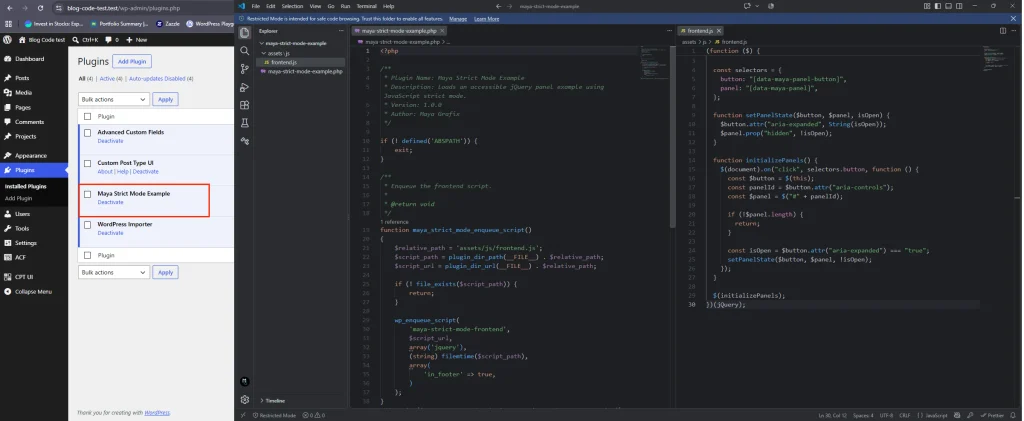
Create this folder structure:
maya-strict-mode-example/
├── maya-strict-mode-example.php
└── assets/
└── js/
└── frontend.js
Create the Plugin File
Add the following complete code to `maya-strict-mode-example.php`:
<?php

/**
 * Plugin Name: Maya Strict Mode Example
 * Description: Loads an accessible jQuery panel example using JavaScript strict mode.
 * Version: 1.0.0
 * Author: Maya Grafix
 */

if (! defined('ABSPATH')) {
    exit;
}

/**
 * Enqueue the frontend script.
 *
 * @return void
 */
function maya_strict_mode_enqueue_script()
{
    $relative_path = 'assets/js/frontend.js';
    $script_path = plugin_dir_path(__FILE__) . $relative_path;
    $script_url = plugin_dir_url(__FILE__) . $relative_path;

    if (! file_exists($script_path)) {
        return;
    }

    wp_enqueue_script(
        'maya-strict-mode-frontend',
        $script_url,
        array('jquery'),
        (string) filemtime($script_path),
        array(
            'in_footer' => true,
        )
    );
}
add_action('wp_enqueue_scripts', 'maya_strict_mode_enqueue_script');
The dependency array is the important WordPress part. Declaring jquery tells WordPress to load its registered jQuery script before this file. There is no need to add a CDN copy or hardcode a script tag.
Using filemtime() as the version changes the script URL when the file changes, which helps avoid stale cached JavaScript during development. On a production deployment where timestamps are not stable, a plugin version constant is a reasonable alternative.
The current parameter format is documented in wp_enqueue_script(), and the Plugin Handbook explains server-side PHP and enqueuing.
Create the Strict jQuery File
Add this complete code to assets/js/frontend.js:
(function ($) {
  "use strict";

  const selectors = {
    button: "[data-maya-panel-button]",
    panel: "[data-maya-panel]",
  };

  function setPanelState($button, $panel, isOpen) {
    $button.attr("aria-expanded", String(isOpen));
    $panel.prop("hidden", !isOpen);
  }

  function initializePanels() {
    $(document).on("click", selectors.button, function () {
      const $button = $(this);
      const panelId = $button.attr("aria-controls");
      const $panel = $("#" + panelId);

      if (!$panel.length) {
        return;
      }

      const isOpen = $button.attr("aria-expanded") === "true";
      setPanelState($button, $panel, !isOpen);
    });
  }

  $(initializePanels);
})(jQuery);
The event handler uses a normal function because jQuery supplies the clicked element as this. The selector is delegated from document, so the behavior also works if matching buttons are inserted after page load.
The script keeps the visual state, the hidden property, and aria-expanded synchronized. Strict mode is useful here, but it does not replace good structure, accessibility, or defensive checks.
Add the Matching Markup
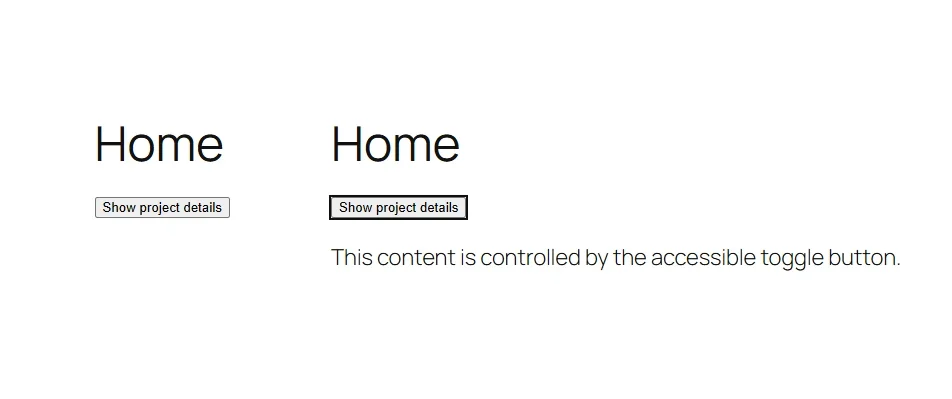
The JavaScript expects a button and panel with matching IDs:
<button
  type="button"
  data-maya-panel-button
  aria-controls="maya-project-details"
  aria-expanded="false"
>
  Show project details
</button>

<div id="maya-project-details" data-maya-panel hidden>
  <p>This content is controlled by the accessible toggle button.</p>
</div>
You can place this markup in a template, a custom block, or a Bricks Code Element when the HTML is specific to one page. For site-wide behavior, I would still keep the JavaScript in the enqueued plugin file so there is one maintained copy.
How to Test the Difference Yourself
The easiest way to understand strict mode is to compare the same mistake with and without the directive on a local development site.
Open the page and launch Chrome DevTools.
Open the Console tab.
Run the non-strict example inside a normal function and inspect the new property on window.
Run the strict example and note the ReferenceError and line number.
Remove the accidental global from window if you created one, or refresh the page.
function nonStrictExample() {
  mayaTemporaryValue = "created globally";
}

function strictExample() {
  "use strict";
  mayaAnotherValue = "this will fail";
}

nonStrictExample();
console.log(window.mayaTemporaryValue);

strictExample();
Only run code you understand, and use a local or staging site rather than experimenting in a sensitive production session. The Console executes with the permissions of the page you currently have open.
Modern ES Modules Are Already Strict
JavaScript modules run in strict mode automatically. If a browser loads a file as a module, adding 'use strict'; does not make it stricter.
// frontend-module.js
export function initializeMenu() {
  // This module is already in strict mode.
}

initializeMenu();
WordPress has a dedicated script-module API for modern module workflows. If you are building around modules, imports, and exports, I would rely on the module semantics and leave out the redundant directive.
Traditional WordPress scripts are still common, especially in existing themes, jQuery plugins, builder integrations, and small custom plugins. In those files, the function-scoped directive remains clear and useful.
When use strict Is Still Worth Adding
I still add the directive when I am writing a classic JavaScript file that is not automatically strict, particularly when the file uses the WordPress jQuery IIFE pattern.
A traditional script is enqueued through wp_enqueue_script().
The code extends an existing jQuery-based WordPress feature.
The file may be bundled beside older code, so function-level scope is safer than assuming the complete bundle can be strict.
I am maintaining legacy code and want invalid assignments to fail during testing.
I normally leave it out when the file is an ES module, because modules are already strict. I also do not treat the directive as a substitute for ESLint, browser testing, type checking where appropriate, or a clear module boundary.
Best Practices for Strict jQuery Code in WordPress
Strict mode works best as one small part of a disciplined WordPress JavaScript workflow.
Put 'use strict'; at the beginning of the IIFE, before normal statements.
Declare every variable with const or let; prefer const until reassignment is required.
Pass jQuery into the wrapper instead of creating or expecting a global $.
Declare jquery as a WordPress dependency instead of loading another copy from a CDN.
Use normal functions for jQuery callbacks that rely on the element-bound this value.
Keep selectors and helper functions inside the wrapper unless another script genuinely needs an explicit public API.
Test pages with the Console open so strict-mode errors are visible immediately.
Load project functionality through a custom plugin when it should survive a theme or builder change.
For broader WordPress architecture, I use the same principle described in my article on choosing between WordPress and a custom website: let WordPress handle the platform work, then add focused custom code where it provides a clear benefit. WordPress vs Custom Website
Common Mistakes
The first mistake is describing strict mode as a jQuery feature. That makes the article or code comment misleading, even if the code itself runs correctly.
Another mistake is placing the directive after executable code. It must be part of the opening directive prologue. If a constant or jQuery call appears first, the later string has no effect.
I also see developers assume strict mode makes $ work in WordPress. It does not. The IIFE parameter solves the noConflict issue; strict mode changes JavaScript semantics inside the wrapper.
Do not load a second copy of jQuery simply because $ is undefined. Declare the dependency and use the wrapper. Duplicate versions can create exactly the kind of compatibility problem the WordPress script system is designed to avoid.
Finally, do not switch old production code to strict mode without testing. Strict mode is valuable precisely because it exposes assumptions. Those errors should be fixed on local or staging before deployment.
When a problem could come from the theme layer, the isolation method in Why a Default WordPress Theme Is a Powerful Troubleshooting Tool can help you narrow the source before editing code.
Strict Mode Does Not Secure Your WordPress Site
Strict mode prevents certain JavaScript mistakes, but it is not a WordPress security feature. It does not validate user input, verify a nonce, check capabilities, escape PHP output, or protect a REST endpoint.
If JavaScript sends data to WordPress, the server must still authorize and validate the request. Client-side checks improve the interface; they do not replace server-side security.
For related server-side examples, see WordPress REST API Explained. If the data comes from structured WordPress content, Custom Post Types with ACF explains how that content can be modeled and exposed through the REST API.
Final Thoughts
I still use 'use strict'; in classic WordPress jQuery files because it catches a useful class of mistakes with almost no overhead. The function-scoped IIFE pattern also fits the way WordPress handles jQuery and keeps the change local to my code.
For modern ES modules, the directive is unnecessary because the module is already strict. For traditional scripts, especially code added to an established WordPress site, it remains a simple and sensible guardrail.
The important part is knowing which problem each line solves. The wrapper gives jQuery a local $ alias. Strict mode makes JavaScript less forgiving of several mistakes. WordPress enqueueing manages the dependency and loading order.
Do you still include 'use strict'; in your WordPress scripts, or have most of your projects moved to modules? I would be interested to hear what your current workflow looks like.
Frequently Asked Questions
No. Strict mode is a JavaScript language feature. jQuery code can run inside a strict JavaScript scope, and jQuery 3.0 and later builds the library itself in strict mode, but jQuery does not provide a separate strict-mode setting for your script.
It applies JavaScript strict-mode rules to the script or function containing the directive. In practical jQuery code, it can catch undeclared assignments, turn some silent failures into errors, and prevent an unbound standalone function from receiving the global object as this.
Placing it first inside the IIFE makes that wrapper and its nested functions strict without changing unrelated scripts. The same IIFE passes the global jQuery object into a local $ parameter for WordPress noConflict compatibility.
No. Use the noConflict wrapper or a jQuery ready callback that receives $. Strict mode and the $ alias solve different problems.
It removes or changes some risky language behavior, but it does not secure WordPress requests or data. WordPress security still requires server-side capability checks, nonces where appropriate, validation, sanitization, and escaping.
Add it to classic scripts when you want strict behavior and the file is not already strict. Do not add it merely by habit. ES modules and class bodies are already strict.
It can expose code that depended on accidental globals, silent assignment failures, or non-strict this behavior. That is useful, but test legacy code on local or staging and fix each reported assumption before deployment.
Strict semantics can make some code easier for engines to reason about, but performance is not the main reason I use it. The practical benefit is earlier, clearer failure when the code makes certain mistakes.
Yes, if the JavaScript is a classic script. For a small page-specific example, place it first inside the jQuery IIFE. For reusable or site-wide behavior, I prefer an external file loaded through a custom plugin.