If you’ve been using Bricks Builder for a while, you’ve probably come across situations where the built-in Dynamic Data is not quite enough. Maybe you need to display a custom heading, format an ACF field before showing it, or output something that Bricks does not provide out of the box.
This is where Bricks Builder Echo Functions become incredibly useful.
I use Echo Functions regularly because they let me write the PHP logic once and then reuse it anywhere Dynamic Data is supported. It keeps templates cleaner, avoids duplicated code, and makes future updates much easier.
In this article, I’ll show you how to create your own Echo Functions, register them with Bricks, and use them throughout your website.
What is a Bricks Builder Echo Function?
A Bricks Builder Echo Function is simply a PHP function that Bricks can execute through Dynamic Data.
Instead of writing PHP directly inside templates or repeating the same logic in multiple places, you write a reusable function and call it wherever you need it.
For example:
{echo:current_year}When Bricks encounters this Dynamic Data tag, it runs the PHP function and displays whatever the function returns.
It really is that simple.
Why do Echo Functions need to be registered?
One question that often comes up is why Bricks requires Echo Functions to be registered before they can be used.
The answer is security.
Imagine if Bricks allowed any PHP function to be executed through Dynamic Data. Anyone with access to the builder could potentially execute PHP functions that were never intended to be exposed.
To prevent that, Bricks only allows functions that have been explicitly registered. Think of it as a whitelist of approved functions.
You can read the official Bricks Academy reference here: Bricks Academy: bricks/code/echo_function_names.
Creating Your First Echo Function
For this first example, we’ll create a function that displays the current year.
Now, Bricks already provides an inbuilt Dynamic Data option for displaying the current year. So this is not something you would normally create an Echo Function for. I’m only using it here because it is a simple example that makes it easy to understand how Echo Functions work.
function current_year() {
    return date( 'Y' );
}
Notice that the function uses return instead of echo.
Bricks expects the function to return a value. If you use echo, the Dynamic Data output may not behave the way you expect.
Registering Your Echo Functions
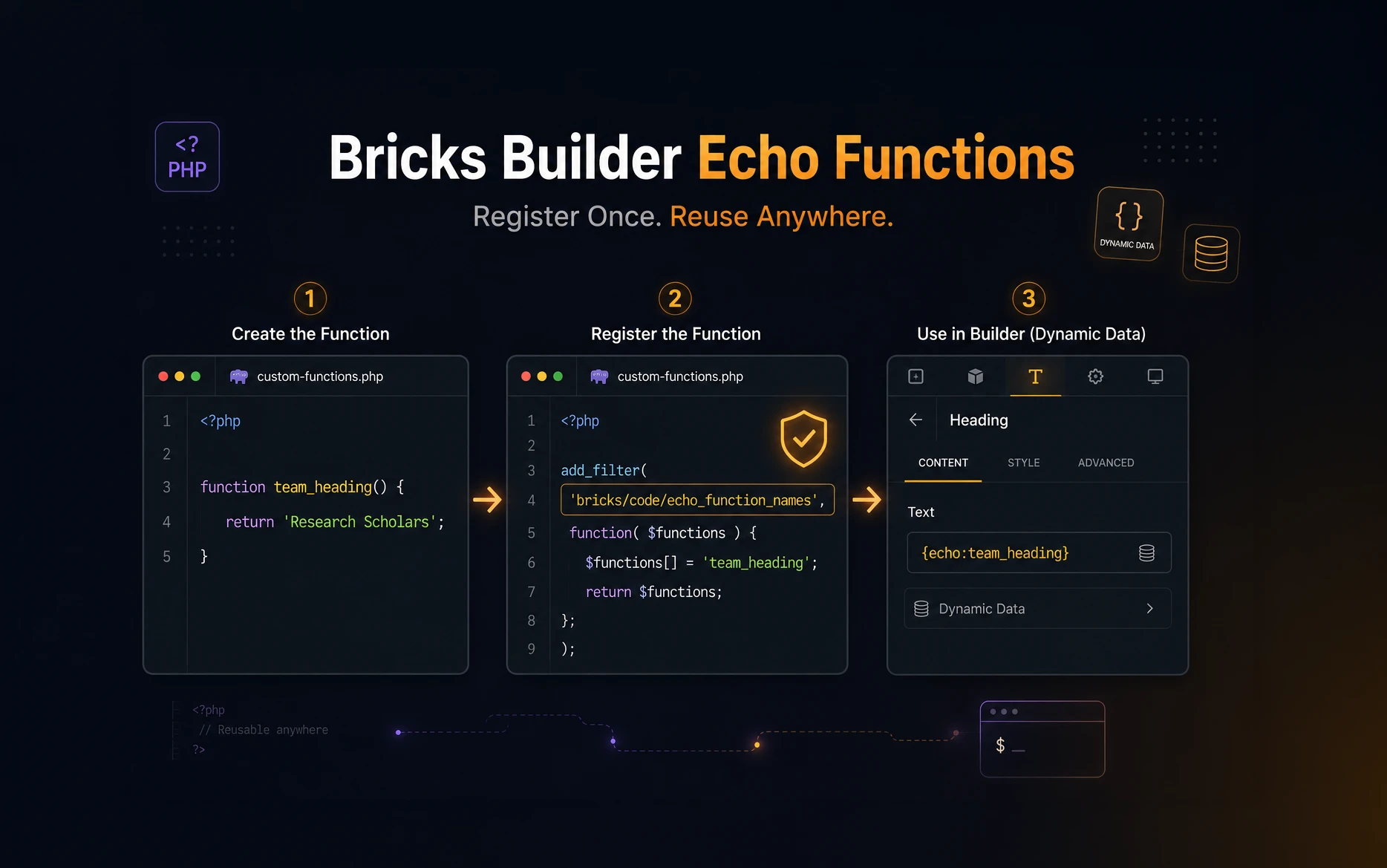
Once you have created your functions, you need to register them with Bricks.
The Bricks Academy documentation shows the registration using the bricks/code/echo_function_names filter.
add_filter( 'bricks/code/echo_function_names', function() {

    return [
        'current_year',
        'greeting',
        'full_name',
        'team_heading',
    ];

} );
Every function that you want Bricks to execute should be added to this array.
If you later create another Echo Function, simply add its name to the list.
Using the Echo Function in Bricks
Now you can use the function anywhere Dynamic Data is supported.
{echo:current_year}The output will be something like this:
2026That is your first Bricks Builder Echo Function.
A Note About Function Names
In the examples above, I’m using simple function names so the tutorial is easy to follow.
In a real project, I would not use generic names like current_year() or team_heading(). There is always a chance that another plugin, theme, or custom snippet may already use the same function name.
My recommendation is to use your own project prefix. For example, if your project prefix is site_, the function could become site_team_heading().
This small habit helps prevent naming conflicts later.
Passing Parameters
Echo Functions become much more powerful when you start passing parameters.
Here is a simple example:
function greeting( $name = 'Guest' ) {

    return "Welcome, {$name}!";

}
After registering the function, you can call it like this inside Bricks:
{echo:greeting:John}Output:
Welcome, John!Passing parameters lets you reuse the same function in different situations without writing additional PHP.
Passing Multiple Parameters
Echo Functions are not limited to a single parameter.
For example:
function full_name( $first_name = '', $last_name = '' ) {

    return trim( "{$first_name} {$last_name}" );

}
Use it like this:
{echo:full_name:John:Smith}Output:
John SmithI’ve found this useful when formatting names, addresses, labels, and small pieces of reusable text inside templates.
A Practical Bricks Example: Dynamic Team Heading
Here is a more realistic example.
I recently worked on a page where the same Bricks template displayed different team groups depending on the URL.
The URLs looked like this:
/team?research-scholars
/team?post-doctoral-fellows
/team?project-students
Instead of creating three separate templates, I created a single Echo Function that checks the URL and returns the correct heading.
function team_heading() {

    $headers = [
        'research-scholars'     => 'Research Scholars',
        'post-doctoral-fellows' => 'Post-Doctoral Fellows',
        'project-students'      => 'Project Students',
    ];

    foreach ( $headers as $param => $title ) {

        if ( isset( $_GET[ $param ] ) ) {
            return $title;
        }

    }

    return 'Our Team';

}
After registering the function, I only needed this Dynamic Data tag inside the heading element:
{echo:team_heading}Now the heading changes automatically depending on the URL, while the same Bricks template is reused for every page.
This is exactly the kind of use case where Echo Functions make sense. The logic stays in PHP, and the Bricks template remains clean.
Improving the URL Parameter Example
The previous example works, but if you want to be stricter, you can sanitize the URL parameter before using it.
Since this example only checks whether a parameter exists, the risk is lower. But in real projects, once you start reading user input, sanitization should become automatic.
Here is a slightly more careful version:
function team_heading() {

    $headers = [
        'research-scholars'     => 'Research Scholars',
        'post-doctoral-fellows' => 'Post-Doctoral Fellows',
        'project-students'      => 'Project Students',
    ];

    foreach ( $headers as $param => $title ) {

        if ( array_key_exists( $param, $_GET ) ) {
            return esc_html( $title );
        }

    }

    return 'Our Team';

}
In this case, the heading values are hardcoded, but I still prefer returning safe output when the function is directly responsible for displaying text.
Where Should You Store Echo Functions?
You can place Echo Functions inside your theme’s functions.php file, and for quick testing that is fine.
But for production websites, I personally prefer creating a small custom plugin.
There are a few reasons for this:
- The functions stay independent of the active theme.
- Theme updates will not affect your custom code.
- The plugin can be reused across multiple projects.
- Your custom functionality stays organised in one place.
This has become my standard workflow for reusable Bricks and WordPress functionality.
If the code is only for one small experiment, functions.php is okay. If the logic is part of the website’s actual functionality, I prefer a plugin.
Should You Use Echo Functions or the Bricks Code Element?
Bricks also gives us the Code Element, and it is useful in the right situation.
I usually think about it this way.
If the PHP is needed only once on a single page, the Bricks Code Element can be enough.
If the logic will be reused across templates, pages, query loops, or multiple projects, I prefer an Echo Function.
The Echo Function keeps the logic centralised. The Bricks template only contains the Dynamic Data tag.
Best Practices
Here are a few habits that I follow when creating Bricks Builder Echo Functions.
- Return values instead of echoing them.
- Use a unique project prefix in production code.
- Keep each function focused on one task.
- Sanitize user input before processing it.
- Escape output when necessary.
- Store reusable functions inside a custom plugin whenever possible.
- Avoid using Echo Functions for things Bricks already handles well.
That last point is important. Echo Functions are powerful, but they are not meant to replace every built-in Bricks feature.
For example, if Bricks already gives you a Dynamic Data tag for the current year, use that. Save Echo Functions for custom logic that Bricks does not already provide.
Common Mistakes
The most common mistake is using echo instead of return.
Incorrect:
function my_function() {
    echo "Hello";
}
Correct:
function my_function() {
    return "Hello";
}
Another common mistake is forgetting to register the function.
Even though the PHP function exists, Bricks will not execute it until it has been included in the bricks/code/echo_function_names filter.
Also be careful with function names. Generic names can create conflicts. In production, always use your own prefix.
Final Thoughts
Bricks Builder Echo Functions are one of those features that do not get talked about very often, but once you start using them, you will probably find yourself reaching for them in many projects.
I’ve used them for dynamic page headings, formatting field values, displaying user information, reading URL parameters, querying custom tables, and solving small project-specific problems that Bricks does not handle by default.
The biggest advantage is that you only write the logic once. After that, you can reuse it anywhere Bricks supports Dynamic Data.
Just don’t use Echo Functions for everything. If Bricks already has an inbuilt option, use the inbuilt option. If you need custom PHP logic that should be reusable, that is where the Bricks Builder Echo Function really shines.
Frequently Asked Questions
Yes. Since an Echo Function is just a PHP function running inside WordPress, you can use WordPress core functions, ACF, WooCommerce, custom post types, and functions provided by other plugins.
Yes. An Echo Function can return HTML instead of plain text. Just make sure any dynamic content is properly escaped before returning it.
Yes. Echo Functions can accept multiple parameters, making them ideal for reusable formatting functions and more advanced dynamic content.
If the PHP logic will be reused across multiple templates or pages, I recommend using an Echo Function. If it’s only needed once on a single page, the Bricks Code Element is usually the better choice.
No. Bricks Builder already includes a built-in Dynamic Data option for displaying the current year. The example in this article is only used to demonstrate how Echo Functions work with a simple use case.